


Adonit
Bilby 3D
BirdBrain Technologies
Bluelounge
Bonelk
Catalyst
Classroom21
ClassVR
Cleverbooks
Edison
Education Technology Specialists
ElecFreaks
Espresso
Eyepower
Eyepower Games
FlashForge
Focus Educational
Hear and Learn
Honestech
HoverCam
Hue
Kai's Clan
LapCabby
Lightspeed
littleBits
LUXROBO
MakeKit
MaKey MaKey
Merge
micro:bit
Mobile Pixels
Nanoleaf
Netatmo
NVS
Ozobot
Paperlike
PC Locs
PC merge
Robolink
Sammat Education
Satechi
Shintaro
Software MacKiev
Sphero
Swivl
Thronmax
TTS
Twelve South
UGEE


Twelve South Compass Pro Folding Stand
$90.90 ex GST
The new iPad Pro is a Creative Pro's dream. Now, meet its easel. The completely redesigned Compass Pro is a versatile all-metal folding stand that holds your iPad at three different angles ‚ both vertically and horizontally. Use Compass Pro as a hands-free display stand, an active desktop stand for interacting with iPad or as a typing/sketching wedge. This solid steel stand has soft silicone in the right places. It‚'s strong, stable and folds flat to go wherever your iPad roams. Compass Pro works with all iPad Pro, iPad and iPad mini models. Holds iPad at three different angles for hands-free (or hands-on) use Super-stable metal design supports even the largest 12.9 iPad Pro 2nd leg tilts iPad up to a more comfortable typing or sketching angle Folds flat for complete portability and works with most iPad covers & cases
There's no limit to how you use Compass Pro with iPad Pro. Sitting on this stand, vertically or horizontally, you can unlock your iPad with Face ID and tap & swipe away on your favorite apps. Use it as a hands-free display stand for watching videos or as your Square register at the farmer's market.
Fold down the secondary leg and Compass Pro angles your iPad low- creating an instant typing stand or desktop dock for using iPad Pro connected to a monitor. When you're done working, Compass Pro folds to the size of a candy bar to fit in your favorite bag so it's always ready for action.
Compass Pro isn't just for hands-free use. When it's time to work, Compass Pro tilts iPad to a more natural typing and sketching angle. Work more comfortably for longer anywhere you go - hotels, on a plane or coffee shop. Speaking of the coffee shop, do you really want to set your expensive iPad on a sticky, messy counter? This little stand helps keep your iPad up and away from dirty surfaces.
Thanks to three angle positions, Compass Pro adapts to the apps you're using on iPad Pro - vertically or horizontally. Compass Pro is your hands-free display stand for FaceTime calls. Lower the third leg to the ‚ desktop active angle for things like reviewing email and moving objects between apps. Fold Compass Pro down to a typing wedge for sketching, finessing a Photoshop project, or as a naturally angled keyboard stand when iPad Pro is connected to an external monitor.


Twelve South Curve for MacBook
$89.99 ex GST
At first glance it looks like a work of art. Look closer and see Curve is an elegant, aluminium MacBook stand. A classic stand, redesigned for the modern MacBook! One that lifts MacBook an ergonomically correct 16.5 cm above your desk, with a 25-degree angle. A durable and reliable stand, featuring a sleek aluminium design enhancing any work environment and matching the sophisticated look and feel of Apple's MacBook models.
Use the Curve to create a more comfortable, more efficient desktop setup by pairing MacBook with your favourite keyboard and mouse. A soft silicone lip keeps your MacBook in place, while rubber feet protect your work surface. The Curve also provides 360-degrees of air circulation for a quieter, cooler MacBook.
Need to enter a keyboard shortcut or tap your Touch Bar? Curve puts them within easy reach. When it's time to go mobile, unplug your MacBook and roll out leaving a riveting sculpture behind.
The most beautiful laptop in the world, should be accompanied by most beautiful accessories. Crafted in matte aluminium, the flowing ribbon design of Curve pairs perfectly with any MacBook placed atop. This stand is compatible with all MacBook models and other laptops.
Raises screen (16.5 cm) off desk for improved ergonomics and airflow®
Pair with a full-size keyboard & mouse to add comfort and convenience to a desktop setup at work or at home
Use alongside an external display for the ultimate dual-screen workstation
Durable and reliable
Added comfort to posture at work or at home
Sculpted modern minimal aluminium design fits all models of MacBook, and other laptops


Twelve South Curve Riser
$127.26 ex GST
Curve Riser is a premium metal stand inspired by Curve for MacBook. This sleek, fixed-height stand showcases and elevates your iMac, iMac Pro or external display to a more comfortable viewing height. The convenient storage shelf holds hard drives, hubs and personal gear. The metal shelf's ventilated design keeps optimal airflow for gear and devices. The storage area is even large enough for audio interfaces or even a Mac mini. Elevate the look and comfort of your workspace with Curve Riser.
Elevates iMac or external monitor for improved ergonomics
Integrated shelf stores hubs, hard drives and personal gear
Design complements Curve for MacBook, for a streamlined desk setup
Fits monitor bases up to 10-inches wide
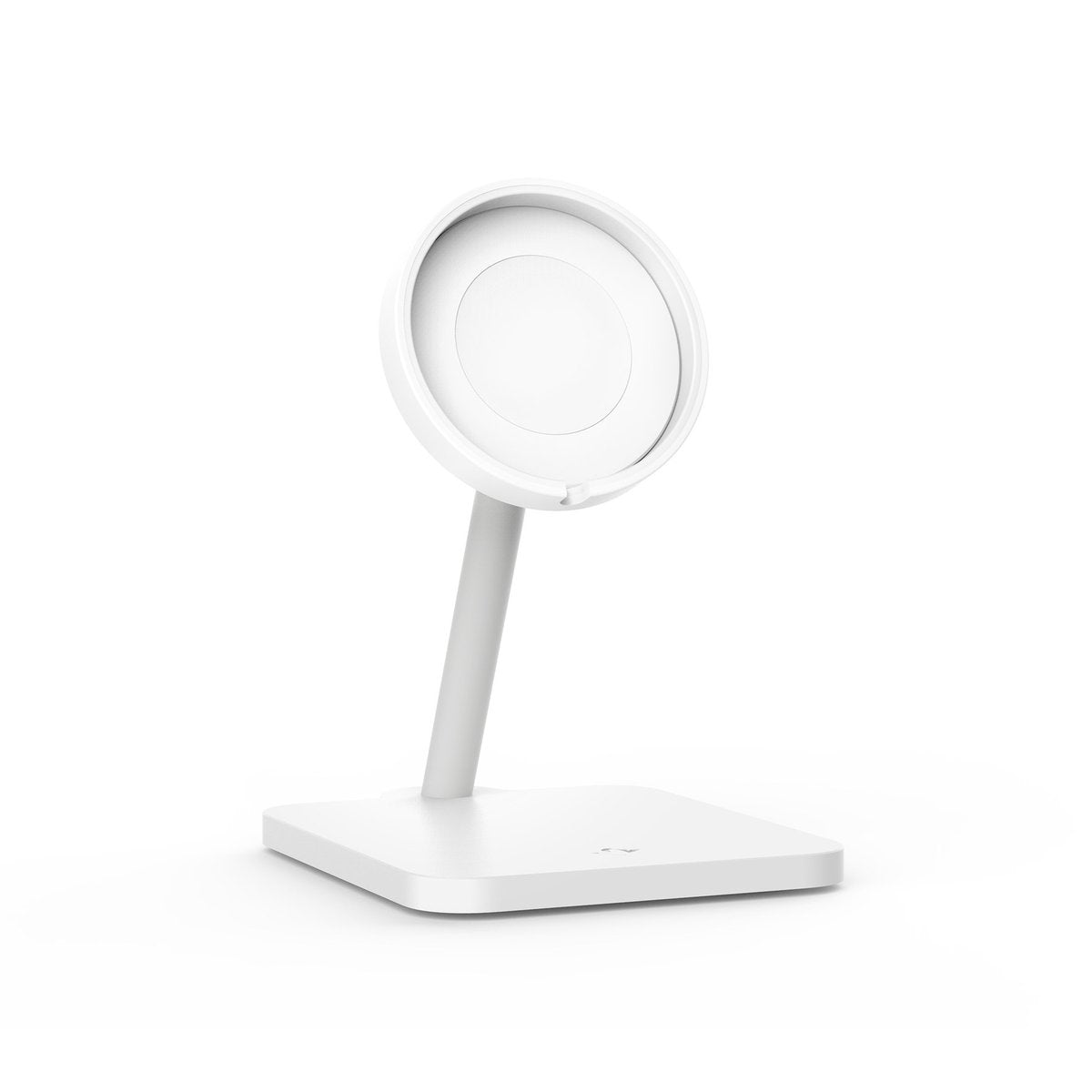
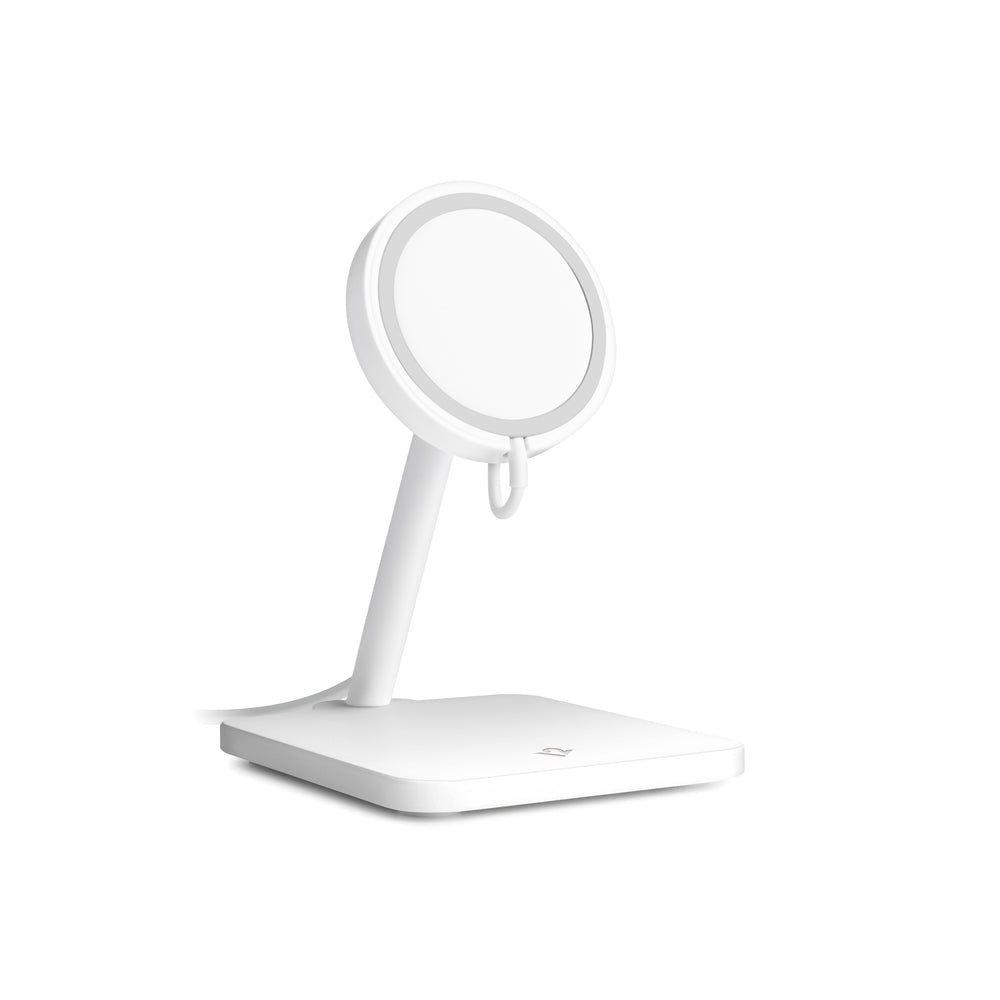
Twelve South Forte for iPhone
$64.99 ex GST
Forté for iPhone is a modern wireless charging stand made exclusively for iPhone and the Apple MagSafe Charger. Snap your MagSafe Charger into Forté and you instantly have a clever way to dock your iPhone while it wirelessly charges at a speedy 15 Watts. It magnetically holds your phone vertically or horizontally for hands-free use. As a bonus, the platform tilts up to 70-degrees to create the perfect viewing angle or charging pedestal for your AirPods. When it’s time to travel, your MagSafe charger easily pops out to go.
Forté is the ultimate desktop, countertop or bedside charging stand for iPhone. Magnetically suspended on Forté, you can stream shows, FaceTime or attend Zoom meetings - all hands free. The top of Forté tilts 70 degrees to provide the perfect viewing angle. You can also position your phone in landscape or portrait mode. Forté creates the best MagSafe experience with the fastest wireless charging & iPhone magnetic support you can use with one hand.
When your iPhone is lying flat on your MagSafe Charger, there’s not much you can do with it. But snap your MagSafe Charger into Forté, and now you have a great-looking, useful charging stand that’s right at home anywhere in your home. Your MagSafe Charging disc fits like a glove in Forté and it’s a snap to remove it when you need to take your MagSafe Charger with you.
The bonus feature on Forté is that you can tilt the top to a 90-degree angle to create a perfect flat platform for charging AirPods and AirPods Pro. Just set your AirPods case on top of Forté and the wireless charging magnet will do its thing.
Pairs with MagSafe Charger for fastest wireless charging possible
Holds iPhone in portrait or landscape and tilts 70-degrees
Use as a pedestal charger for AirPods and AirPods Pro
Easily insert and remove MagSafe Charger (not included) for travel
Compatible with iPhone models that feature the MagSafe Charger


Twelve South HiRise for MacBook
$129.99 ex GST
Designed for laptops of all sizes.
HiRise for MacBook is a beautifully designed, height-adjustable stand that elevates your laptop to a comfortable desktop. HiRise does what fixed stands can't do. It lets you set your MacBook Pro or MacBook Air from a few inches, up to a half foot off your desk, which makes it perfect for MacBooks and users of all sizes. You'll see HiRise as more of an upgrade than an accessory.
The convenience of a laptop, the comfort of a desktop.
Made exclusively for MacBook, HiRise elevates your laptop up off your desk, reducing neck strain and creating a more comfortable work setting. Perch your MacBook Pro or Air on HiRise and pair with your favorite wireless keyboard and mouse to create an ultra-comfortable, super convenient workstation.
What goes up must come down.
When it comes to laptop stands, one height does not fit all. You'll see what we mean the first time you use HiRise for MacBook. This sleek, brushed metal stand has a spring-loaded stem that lets you easily raise or lower the height to the viewing position most comfortable for you. If you connect your MacBook to an external monitor, you can use HiRise to align the two for the ultimate dual-display setup. Ready to give HiRise a high-five?
One stand for all MacBooks.
Whether you're rocking an 11-inch MacBook Air or a 15-inch MacBook Pro, this height-adjustable stand delivers desktop comfort. HiRise has v-shaped arms that are lined with a soft silicone that grips the base of your Mac. The arms also allow maximum airflow around your laptop. On the bottom of the metal stand, you'll find teflon rails that allow you to spin HiRise from side to side without leaving marks on the surface of your desk.
Unique Dual-Screen Backgrounds for HiRise
When you pair your MacBook with HiRise and an external display, you get more than dual screens -- you get a gorgeous, seamless horizon to work with. We always wanted to create backgrounds that matched up perfectly for dual displays, so we partnered with photographer Scott Gordon to create a collection of all-original, dual-screen desktop backgrounds for your Mac. They're free to download as our gift to you.


Twelve South HiRise Pro for iMac
$218.17 ex GST
HiRise Pro is a beautiful, height-adjustable modern stand that boosts your iMac, iMac Pro, or external display, for reduced neck and back strain. This stylish stand elevates a display to multiple heights (up to 10 cm), giving you a better ergonomically designed setup or use this stand to lift the iMac to the same height as a secondary display.
To reduce desk clutter, the all metal stand doubles as a gear storage offering plenty of hiding space to house hubs, hard drives and things like your AirPods, wallet or keys. HiRise Pro has a vented front grille that ensures hidden hard drives have ample air circulation. Stash that tangled mess of cables inside HiRise Pro, and simply feed out the right amount of cable through the cable management slot on the back of the stand.
HiRise Pro features a soft supple leather valet tray on top of the stand. Use this leather pad as primo parking and charging space for your iPhone or Apple Watch. The leather lined top is also a perfect spot to drop your keys or glasses.
Functional and beautiful, it is the only stand worthy of supporting current iMacs, the new iMac Pro and high-end 4K / 5K displays (with a base width of 25 cm or less). The gunmetal steel, topped with leather, is sure to fit seamlessly into any setup. All these little details add up to one awesome stand to complete your ultimate desk goals.
Height adjustable stand for iMac and displays
Elevates displays to multiple heights up to 10 cm (4 shelf heights)
Internal storage for hard drives, personal items or excess cable
Padded leather top valet perfect for parking items like iPhone, Apple Watch, keys and more
Beautiful design fits seamlessly into any setup
Designed for iMac/iMac Pro, compatible with displays with a base width of max 25 cm


Twelve South MagicBridge
$59.99 ex GST
MagicBridge connects your Apple Magic Keyboard and your Magic Trackpad 2, creating a one-piece control surface that lets you type and swipe more efficiently. MagicBridge cleans up your desktop, or rests on your lap, to completely control your Mac from afar. Connecting your keyboard and trackpad brings everything together, like a MacBook. Left or right-handed? No worries. MagicBridge can place your Trackpad on whichever side you prefer.
Have you noticed that the Magic Keyboard & Magic Trackpad 2 look like they were supposed to go together? Having these profile twins connected to form one larger keyboard makes them so much easier to use because they never slide apart. When your trackpad is predictably beside your keys - on the right or left side of your keyboard - your fingers will find it without you having to look down from your screen. Cleaner, faster, more stable control.
Since MagicBridge holds your Apple keyboard and trackpad together as one stable unit, you can use it on any flat work surface or conference room table. But what MagicBridge users really love is being able to use this one-piece unit on their lap with their feet up on the desk or while parked on the sofa.
MagicBridge is precision crafted from polycarbonate, which is feather-light and doesn’t block Bluetooth signals. Whether you place your trackpad to the left or right of your keyboard, you can charge both devices thanks to the carefully crafted access grill. MagicBridge has silicone pads on the inside to protect your keyboard and trackpad, and silicone feet underneath to protect your desk. Once you have MagicBridge, you'll wonder how you lived without it.
Holds keyboard and trackpad together, keeping them from sliding apart
Positions trackpad to the left or right of keyboard
Easy access to power switches and Lightning charging ports
Use MagicBridge Extended on any flat work surface or even on your lap!
Designed specifically to work with the new Apple Magic Keyboard and Trackpad 2
MagicBridge is also compatible with the coloured iMac Keyboards and Trackpads (2021 edition)
Specifications:
Height: 1.4 cm
Width: 44.3 cm
Depth: 11.9 cm
Weight: 0.17 kg
Ê


Twelve South MagicBridge Extended
$89.99 ex GST
MagicBridge Extended connects your Apple Magic Keyboard with Numeric Keypad and your Magic Trackpad 2, creating a one-piece control surface that lets you type and swipe more efficiently. MagicBridge cleans up your desktop, or rests on your lap, to completely control your Mac from afar. Connecting your keyboard and trackpad brings everything together, like a MacBook. Left or right-handed? No worries. MagicBridge can place your Trackpad on whichever side you prefer.
Have you noticed that the Magic Keyboard & Magic Trackpad 2 look like they were supposed to go together? Having these profile twins connected to form one larger keyboard makes them so much easier to use because they never slide apart. When your trackpad is predictably beside your keys - on the right or left side of your keyboard - your fingers will find it without you having to look down from your screen. Cleaner, faster, more stable control.
Since MagicBridge Extended holds your Apple keyboard and trackpad together as one stable unit, you can use it on any flat work surface or conference room table. But what MagicBridge users really love is being able to use this one-piece unit on their lap with their feet up on the desk or while parked on the sofa.
MagicBridge Extended is precision crafted from polycarbonate, which is feather-light and doesn’t block Bluetooth signals. Whether you place your trackpad to the left or right of your keyboard, you can charge both devices thanks to the carefully crafted access grill. MagicBridge has silicone pads on the inside to protect your keyboard and trackpad, and silicone feet underneath to protect your desk. Once you have MagicBridge, you'll wonder how you lived without it.
Holds keyboard and trackpad together, keeping them from sliding apart
Positions trackpad to the left or right of keyboard
Easy access to power switches and Lightning charging ports
Use MagicBridge Extended on any flat work surface or even on your lap!
Designed specifically to work with the new Apple Magic Keyboard and Trackpad 2
Specifications:
Height: 1.4 cm
Width: 58.4 cm
Depth: 11.9 cm
Weight: 0.24 kg
Ê


Twelve South ParcSlope for MacBook, Laptops & iPad
$79.99 ex GST
The Twelve South ParcSlope is a dramatic redesign of their hybrid stand that elevates your MacBook or iPad Pro screen higher – while tilting your device at desk level for more comfortable typing and drawing.
With MacBook, this gives you the extra screen height you need, without giving up the use of your MacBook keyboard or trackpad. When used with iPad, ParcSlope securely tilts your iPad at an 18-degree angle, which makes everything from annotating an image in Notes to sketching in Paper with Apple Pencil feel more natural and comfortable.
ParcSlope features an innovative design update to offer more flexibility between devices. Integrated cable management keeps all your cables and connections nearby, while a top silicone ridge is the perfect perch to store Apple Pencil when not in use.
Raises the screen to a more comfortable eye level
Angles the iPad for sketching and creative work
Increases cooling and airflow around MacBook
Cable management keeps connections handy and accessible


Twelve South PlugBug Duo
$89.99 ex GST
Supercharge your MacBook charger.
Congrats - you've got the newest MacBook with USB-C. Uh-oh, it doesn't charge any of your older gear - your wireless headphones, battery pack, Magic Mouse, etc. PlugBug Duo to the rescue! Snap PlugBug Duo onto your Apple MacBook power adapter and add back two traditional USB charging ports. The perfect accessory for crowded airports, coffee shops, or office power strips, you can charge 3 devices from just one outlet. With five international adapters you can stay charged in over 150 countries, while also being your dual USB charger - no dongles needed!
Adds 2 traditional USB charging ports to your MacBook Pro Power Adapter
Charges 3 items from just one outlet (MacBook + 2 USB charged devices)
Adapts MacBook to over 150 countries with 5 included adapters
Available 2.1A rapid-charges all iPhones & iPads
Relief for disappearing USB Ports.
If you've upgraded your MacBook recently you've noticed it only has USB-C ports, making it a challenge to charge your iPhone, wireless headphones, battery packs, etc., with your MacBook. Instead of buying dongles or carrying extra chargers, why not add PlugBug Duo to the MacBook charger you already have - so you can charge two USB devices, and your MacBook, simultaneously, with one device.
Charge three devices from just one outlet.
PlugBug Duo snaps onto your MacBook power adapter giving you the ability to charge your MacBook plus two additional USB powered devices, such as your iPhone and AirPods, from one outlet. Imagine how awesome that would be in an airport or a coffee shop where outlets are scarce. No more having to decide which item to charge before you board a plane or on a break at a conference.
Charge your MacBook in over 150 countries.
PlugBug Duo includes five Plug Adapters so you can convert your MacBook Power Supply to fit outlets in over 150 Countries. Wherever you roam on your next vacation or business trip, PlugBug has your charging needs covered by adapting your MacBook AND giving you two USB charging outlets.
Make your MacBook charger a Supercharger.
PlugBug Duo really does make your MacBook Power Adaptor even better. How? It snaps onto your MacBook Charger giving you three chargers in one. And this red wonder adapts your MacBook to work anywhere in the world. Why wouldn't you carry PlugBug Duo in your computer bag or backpack?
Twelve South PowerPic mod Wireless Charger
$90.90 ex GST
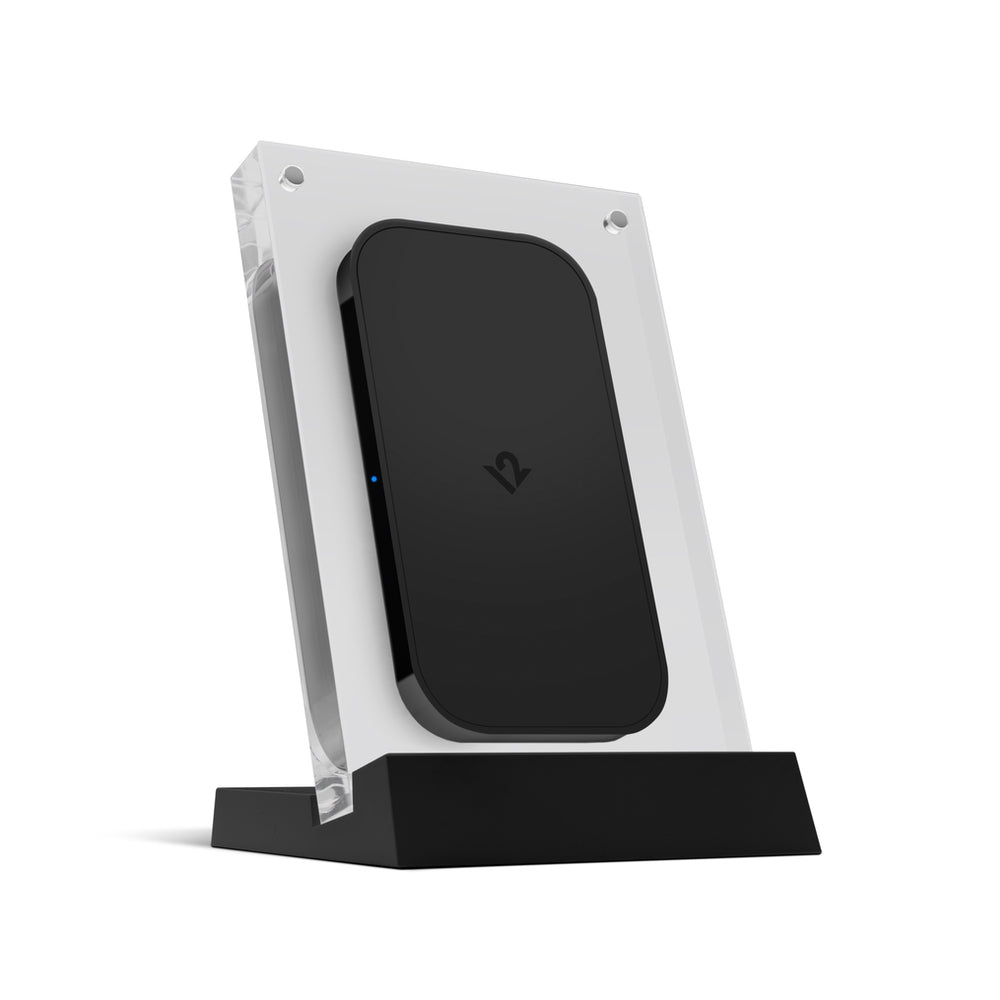
PowerPic mod is a world-class wireless phone charger with a design as radical as wireless charging itself. With a mix of modern elegance and versatile charging options, PowerPic mod charges all phones, including phones in cases, with an aesthetic that looks like nothing else.
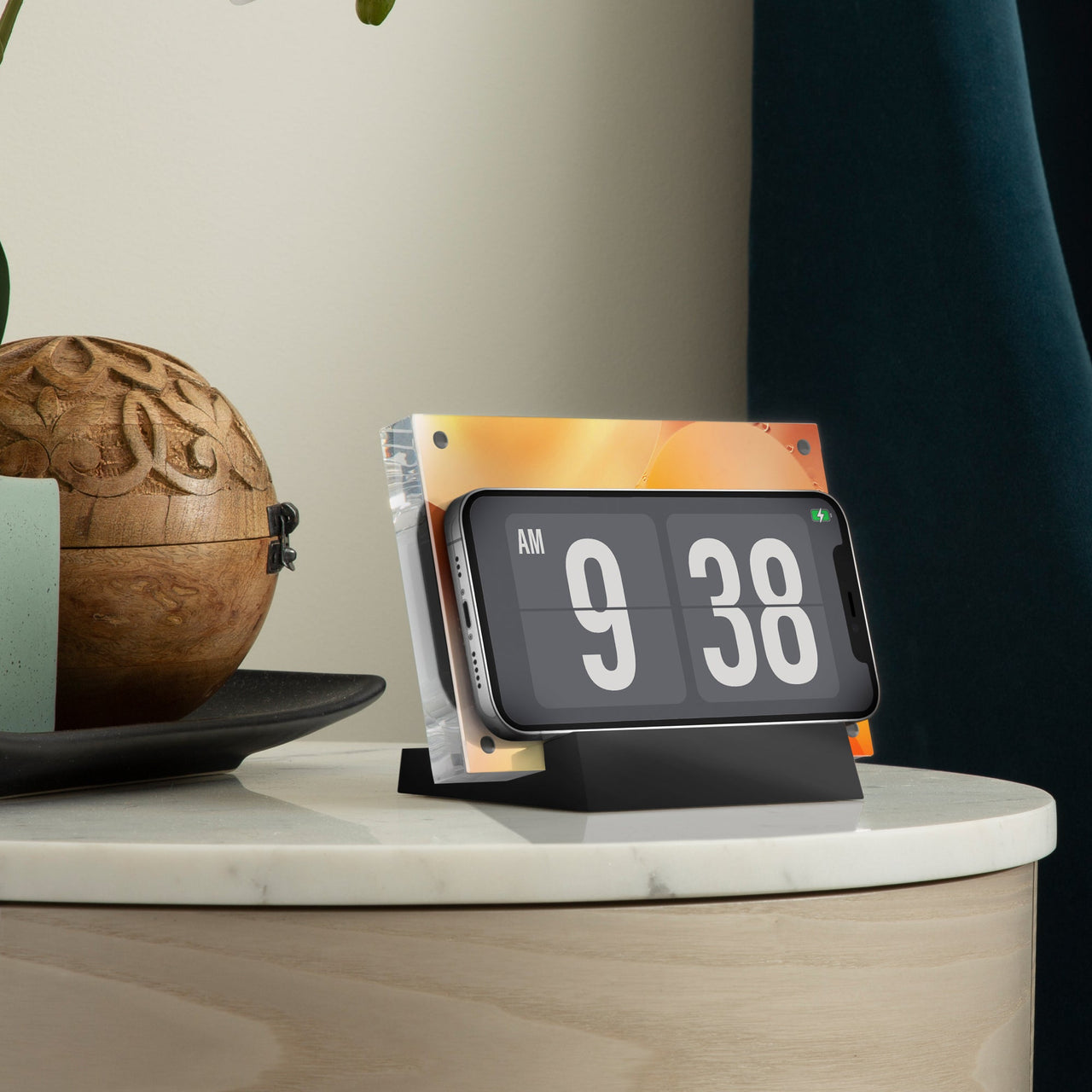
The lucite-framed PowerPic mod can be positioned vertically or horizontally and is even customisable with any 4x6 photo or room-matching graphic. Wirelessly charge your phone on the stand that looks more like a work of art than a typical charging dock.
PowerPic mod brings wireless charging to your world in a beautiful room-enhancing design. This elegant wireless charger looks right at home on your desk, bedside table or kitchen counter. Set your phone vertically or horizontally to charge in either orientation. Need to check a text or a weather app? You can lift your iPhone off of this charger with one hand. Instead of a grey plastic dock or techie-looking gadget cluttering your space, you’ll have a modern design element that looks beautiful and charges your phone at the same time.
PowerPic mod is great looking wireless charger, but you can truly make it your own by adding a 4x6 photo or graphic. Just remove the magnetic front of the lucite frame, add a photo and you’re done. You can use any portrait or landscape image to match your room’s decor, rep your favorite team or flash your current vibe.
PowerPic mod charges any phone that supports wireless charging (and most do!). Whether you have the newest iPhone with MagSafe, or if your iPhone still has a Home button, PowerPic has you covered. Have an Android? PowerPic will charge your phone at a speedy 10W, too. Since PowerPic mod is frameless, there are no phone size limits with this charger. PowerPic mod even works with cases up to 3mm thick. Have AirPods Pro? You’ll be happy to hear PowerPic mod charges them, too.
Beautiful wireless charger that complements your interior design
Compatible with all wireless charging mobile phones (MagSafe, non-MagSafe, Android, etc)
Customisable with any 4x6 photo or custom graphic
Uses any 20-watt USB-C power adapter (not included)
Specifications:
Input connector - USB-C
Included cable is 1.5m USB-C to USB-C
Input: 5V/2A 9V/1.67A
Output: 5W/7.5W/10W
Operation Frequency: 110~205 KHZ Modulation type: CVS
Antenna Type: Coil Antenna Charging efficiency: Approx. 72 percent
Compatibility:
All wireless charging iPhones and smartphones
What's in the box:
PowerPic Charger
PowerPic Base
51.5 m USB-C Power Cable
Owner's Manual


Twelve South StayGo Mini USB-C Hub
$89.99 ex GST
StayGo mini USB-C Hub makes editing video and photos or polishing presentations on your iPad Air or iPad Pro much more convenient. How? By giving you four more ports to get things done.
With a headphone jack, USB, USB-C and an HDMI port, you can connect and power your most essential accessories. Connect StayGo mini directly to your iPad or use the included 0.5 m long cable to place the hub below your Magic Keyboard or HoverBar Duo. Maximise the power of your iPad with a StayGo mini.
iPads have become multimedia tools, but connecting accessories to them has been really clunky - until now. StayGo mini snaps onto your iPad, giving you four neatly arranged extra ports for must-have accessories, like studio headphones, your favourite display and USB drives. Other flush-mount docks don’t work with protective cases. StayGo mini does by using the included USB-C cable to connect this little hub to your iPad without removing your case.
StayGo mini stands out from other iPad hubs by offering the most flexibility with the addition of the StayGo Connection Cable. If you have a protective case on your iPad, then you know that other flush-mount hubs won’t work. But StayGo mini’s included cable allows you to connect everything you need without forcing you to remove your case. The StayGo Connection Cable also allows you to hide StayGo mini (and all of the attached cables) behind your setup, instead of hanging off the side of your iPad. Who doesn’t love a tidier desktop?
StayGo mini can be used with your MacBook to add those essential ports to your laptop, as well. Use StayGo mini to connect a backup USB-A hard drive or other external peripherals. Connect an external display via HDMI for a dual-screen workspace. Have headphones connected to external speakers at your desk? StayGo mini lets you connect (and disconnect) your speakers, hard drives and display with just a single USB-C cable.
USB-C hub connects peripherals to your iPad or MacBook
Four ports: USB-A, HDMI, headphone/audio out and USB-C power
Pass-through power to charge or power accessories
Connects directly to iPad or below with the included cable
Specifications:
Dimensions: 72 x 32 x 8 mm
Ports:
USB-C power | pass-thru 85W USB-C PD charging
4K HDMI | Crystal clear 4K x 2k at 30Hz HDMI / Full 1080p
USB-A 2.0 / BC 1.2 Charging Port | SuperSpeed up to 5 Gbps with BC 1.2 7.5W Fast Charge
Headphone/Audio out
Additional fearures:
Aluminium exterior shell dissipates heat
Plug & Play: no drivers required
USB 2.0 port fully backwards compatible
What's in the box:
StayGo mini
0.5 m desk cable
Owner's manual


Twelve South StayGo USB-C Hub with 1M Cable
$199.99 ex GST
The first desktop-friendly USB-C hub. When looking for a USB-C hub, you'll notice most plug in right next to your MacBook - creating a rat's nest of cables and cords hanging off the side. Yuck. StayGo delivers all the ports you need, but with a setup long enough to neatly tuck away and keep the front of your workspace clean and tidy. Plug in StayGo to connect to all your desktop gear and power - hidden out of sight, but ready to go. StayGo has all the ports previous generations of MacBooks offered, so you can connect everything you had yesterday to the MacBook you have today. Download photos from an SD card, hook up external HDMI monitors, connect backup USB drives, and more in one compact box without cluttering your desk. StayGo even supports up to 85 watts of pass-through power to your MacBook. Connect one USB-C plug to your Mac to attach eight devices and power.
Of course MacBooks are portable, and StayGo is flexible enough to make the journey with you. The included 6-inch travel cable stores inside the hub for traveling with ease. Keeping the cable inside StayGo means it'll be right where you need it, when you need it. And, unlike other hubs with a fixed cable, the StayGo cable stays protected inside the metal hub, eliminating the risk of damage or breaking. The slim compact design of StayGo means it takes up little room in your computer bag or backpack
USB-C Hub connects peripherals to your MacBook
Desktop-length cable allows connections and power to be located out of sight or behind your desk, creating a tidy workspace
Additional Compact Travel Cable stows away directly inside StayGo
Connections include: 4K HDMI, Gigabit Ethernet, USB-A 3.0 (x3), independent SD + Micro-SD card slots and 85W USB-C pass-thru power
Dims: 15mm (H) x 127mm (W) x 62mm (D)
Ports
USB-C (to MacBook) | pass-thru 85W USB-C PD charging
4k HDMI | Crystal clear 4K x 2k @ 30Hz HDMI / Full 1080p
USB-A 3.0 / BC 1.2 Charging Port | SuperSpeed up to 5 Gbps with BC 1.2 7.5W Fast Charge
USB-A 3.0 | SuperSpeed up to 5 Gbps with 900mA power
USB-A 3.0 | SuperSpeed up to 5 Gbps with 900mA power
Gigabit Ethernet Port | Support 10/100/1000Mbps via RJ45 connection
USB-C (from External power) | 100W Max USB-C power input
SD Card | Secure Digital v3.0 UHS-I
Micro SD Card | Secure Digital v3.0 UHS-I
Additional Benefits
Aluminum exterior shell dissipates heat
Plug & Play: no drivers required
USB 3.0 ports all fully backwards compatible
Dual SD Slots support simultaneous data connection


Twelve South SuitCase for MacBook Pro 16" (USB-C)
$159.99 ex GST
Minimal design, Maximum style. Meet SuitCase for MacBook.
SuitCase for MacBook is a handsome, quilted, hard case enveloped in a premium water-resistant twill. Beyond the elegant exterior is a thermoform shell that securely protects your MacBook. When all you need is your MacBook for an off-site meeting, SuitCase is the ultimate shuttle. An innovative suspension system lets you work on your MacBook while it sits safely inside the case. Thanks to a slim design and recessing leather handle, it's no problem slipping SuitCase into your work bag or backpack. Carry your MacBook in style.
MacBook protection never looked so good. SuitCase provides three layers of protection for your MacBook. First is a water-resistant, quilted fabric exterior. Next, beneath the textile covering is a layer of hard plastic to protect your MacBook from impacts. Finally, inside SuitCase is a soft layer of microfiber to protect the surface of your Mac. Dual zippers keep SuitCase securely closed, allowing easy, safe charging with your MacBook enclosed in this cool grey cocoon.
What makes SuitCase the ultimate shuttle? The minimalist thermoformed hardshell case for carrying MacBook with a premium textile exterior with quilted signature diamond pattern and dual weather-resistant zippers and genuine leather handle. With SuitCase, you can work comfortably with MacBook resting in the case.
Is SuitCase all you really need for a meeting? With all-day battery, why lug your backpack or bulky computer bag to a two-hour meeting when all you need is your MacBook? Slip some paperwork and your Lightning Cable into SuitCase and travel light. Think of SuitCase as the carry-on for everyday life.
The Protection of a case with the convenience of a shell. When you take a seat at your favourite coffee shop or workstation, you can work on your MacBook without removing it from SuitCase. Our innovative suspension system holds SuitCase securely against your notebook without interfering with your MacBook's beautiful display. Working with your MacBook in a case is one more way to keep it looking shiny and new so you can cash-in when it's time to trade in.
Minimal design
Thermoformed hardshell Case
Premium textile exterior with quilted diamond pattern
Dual weatherr resistant zippers
Genuine leather handle
Compatibility
16-inch MacBook Pro
Purchase Orders Welcome
Schools and Educational Institutions we offer a Purchase Order option at checkout, ensuring a seamless purchasing process.First-Class Support
We offer exceptional support for our educational products, backed by our firsthand experience as former teachers.Australian Warehouses
Experience efficient and timely delivery as our store ships directly from our suppliers' warehouses in Australia.Australian Owned
Shop with confidence knowing that we are proudly Australian owned, delivering quality products with a touch of true Aussie spirit.