

Adonit
Bilby 3D
BirdBrain Technologies
Bluelounge
Bonelk
Catalyst
Classroom21
ClassVR
Cleverbooks
Edison
Education Technology Specialists
ElecFreaks
Espresso
Eyepower
Eyepower Games
FlashForge
Focus Educational
Hear and Learn
Honestech
HoverCam
Hue
Kai's Clan
LapCabby
Lightspeed
littleBits
LUXROBO
MakeKit
MaKey MaKey
Merge
micro:bit
Mobile Pixels
Nanoleaf
Netatmo
NVS
Ozobot
Paperlike
PC Locs
PC merge
Robolink
Sammat Education
Satechi
Shintaro
Software MacKiev
Sphero
Swivl
Thronmax
TTS
Twelve South
UGEE


Sphero City & Golf Code Mat
$299.99 ex GST
This two-sided mat offers a simple, accessible way to learn block-based coding, basic maths principles, and collaborative problem-solving with any round Sphero robot. Choose Sphero City and Golf Code Mat to tee up your Sphero robot and take a swing while exploring concepts like distance, speed, maths fundamentals, and basic coding or program your robot to navigate around Sphero City using draw, blocks, or text programming.
We recommend using the Sphero City and Golf Code Mat with the Sphero City & Golf Activity Cards which are available for download here.
What’s in the box:
1 Double-Sided Sphero Code Mat (220cm x 115 cm)


Sphero Computer Science Foundations - Course 1
$319.00 ex GST
$336.35 ex GST
$336.35 ex GST
Computer Science Foundations (CSF) by Sphero is a supplemental, standards -aligned curriculum designed to be taught in the classroom with Sphero robots. CSF features three courses, each with their own spiral-bound Educator Guide. Using CSF, teachers and students will explore STEAM principles through creative coding.
CSF features student-facing instructions and pre-loaded blocks for every activity. Teachers can access every lesson in the Sphero Edu app by scanning the QR code or by navigating to the CS Foundations tab under "Activities" in the app. Teachers can then assign individual lessons to each student's Workbook. Many lessons have pre-loaded blocks so students can start coding right away.
Course 1 features three themes, each theme comprising eight lessons. By the end of Course 1, students will demonstrate proficiency with the Draw Canvas and know how to use block programs to manipulate lights and sounds and create loops and conditionals.
Course 1 Content: Arts - using Sphero robots, students will use the Draw and Block Canvas to paint, write poetry, compose music, and dance.
Shapes & Numbers - as students progress to programming with blocks, they'll learn how to connect numbers in equations, play dice games, design guessing games, and create their own figure skating routines.
Nature - students will use their polycarbonate robotic ball to understand the natural world by mimicking the movement of animals, programming a school of fish, and modelling sleep patterns.
By the end of Course 1 students will be able to:
Create their own Draw programs‚ including movement (direction and speed) and lights
Manipulate and sequence movement, lights and sound Blocks.
Create and animate their own designs on the BOLT LED matrix.
Create Block programs with 1 to 2 simple controls, including loop forever and loop x times.
Display a basic understanding of how 1-2 more complex controls, including loop until, if/then, and if/else affect programs.
Explain how conditionals use sensors, comparators, and operators to make decisions.
Read and interpret sensor data from all Draw and basic Block programs.
What's included:
A spiral-bound Course Educator Guide book containing 24 lessons
A unique access code that grants a perpetual license to all digital student-facing materials and content
ACARA and NSW Curriculum Curriculum links for ACARA and NSW are available here.
CS Foundation Course 1 Sample Activities Click here for CS Foundation Course 1 sample activities. CS Foundation Course 1 Sample Pages


Sphero Computer Science Foundations - Course 2
$319.00 ex GST
$336.35 ex GST
$336.35 ex GST
Computer Science Foundations (CSF) by Sphero is a supplemental, standards-aligned curriculum designed to be taught in the classroom with Sphero robots. CSF features three courses, each with their own spiral-bound Educator Guide. Using CSF, teachers and students will explore STEAM principles through creative coding.
CSF features student-facing instructions and pre-loaded blocks for every activity. Teachers can access every lesson in the Sphero Edu app by scanning the QR code or by navigating to the CS Foundations tab under "Activities" in the app. Teachers can then assign individual lessons to each student's Workbook. Many lessons have pre-loaded blocks so students can start coding right away.
Course 2 features three themes, each theme comprising eight lessons. By the end of Course 2, students will demonstrate a mastery of block programming by manipulating sensors, loops, conditionals, variables, and functions.
Course 2 Content: Empathy - with their robots and Block programming skills, students will learn to communicate clearly with their partners, offer praise and encouragement, and grow their classroom community.
Story Telling - in this series of Block lessons, students will use their Sphero robots to represent the elements of a story, develop dialogue, retell historical events, and even overcome writer's block.
Game Design - bring out your inner gamer through a series of lessons designed to develop your Block programming skills‚ play Bingo, search for hidden treasure and build your own set of dice.
By the end of Course 2 students will be able to:
Use a series of nested controls‚ including loops & conditionals‚ to create more complex programs.
Be able to use basic comparators & operators in their conditionals.
Use functions as mini programs to perform a specific task within their larger program.
Use and manipulate all Sphero sensors to meet appropriate purposes in their programs.
Explain how variables are used in a program.
Explain how Blocks equate to JavaScript code and manipulate specific sections of JS code.
What's included:
A spiral-bound Course Educator Guide book containing 24 lessons
A unique access code that grants a perpetual license to all digital student-facing materials and content
ACARA and NSW Curriculum Curriculum links for ACARA and NSW are available here.
CS Foundation Course 2 Sample Activities Click here for CS Foundation Course 2 sample activities. CS Foundation Course 2 Sample Pages


Sphero Computer Science Foundations - Course 3
$319.00 ex GST
$336.35 ex GST
$336.35 ex GST
Computer Science Foundations (CSF) by Sphero is a supplemental, standards-aligned curriculum designed to be taught in the classroom with Sphero robots. CSF features three courses, each with their own spiral-bound Educator Guide. Using CSF, teachers and students will explore STEAM principles through creative coding.
CSF features student-facing instructions and pre-loaded blocks for every activity. Teachers can access every lesson in the Sphero Edu app by scanning the QR code or by navigating to the CS Foundations tab under "Activities" in the app. Teachers can then assign individual lessons to each student's Workbook. Many lessons have pre-loaded blocks so students can start coding right away.
Course 3 features three themes, each theme comprising eight lessons. By the end of Course 3, students will be able to develop complex programs with the Block Canvas and rewrite simple block programs in JavaScript.
Course 3 Content: Missions - in this series of lessons, students will become critical thinkers and problem-solvers as they puzzle through obstacle courses, lockboxes, secret codes, and more.
Navigation - from exploring how animals migrate to planning a road trip, this series of lessons brings the world of navigation to life for students through hands-on programming with their Sphero robots.
Brain Breakers - in this theme, students develop their problem-solving and collaboration skills while creating secret codes, solving riddles and cracking a bank robbery.
By the end of Course 3 students will be able to:
Manipulate variables (numbers, sound) in the Block Canvas.
Apply conditionals without guidance that utilise sensors, comparators.
Develop their own complex programs in Block programming.
Read and interpret simple programs written in JavaScript involving movement, lights, sounds, and loops.
Troubleshoot JavaScript to fix syntax errors.
Rewrite simple Block programs in JavaScript.
What's included:
A spiral-bound Course Educator Guide book containing 24 lessons
A unique access code that grants a perpetual license to all digital student-facing materials and content
ACARA and NSW Curriculum Curriculum links for ACARA and NSW are available here.
CS Foundation Course 3 Sample Activities Click here for CS Foundation Course 3 sample activities. CS Foundation Course 3 Sample Pages


Sphero Edu Self-Guided Professional Development
$154.54 ex GST
Elevate your teaching and coding skills with the Sphero Edu Self-Guided Professional Development course. Designed for educators keen on integrating Sphero robotics into their classrooms, this virtual course serves as a comprehensive guide to harnessing the full potential of Sphero robots and the Sphero Edu app. Dive into programming with Draw, Blocks, and JavaScript Text canvases, and explore classroom applications across all grade levels. With exclusive content and a hands-on approach to STEM education, this course is your ticket to becoming a Sphero Edu expert.
Major Features:
Comprehensive Curriculum: Learn how to use the Sphero Edu app and robots to teach fundamental STEM skills through exciting, hands-on activities.
Flexible Learning: A self-guided, 4-6 hour course that fits your schedule, accessible for 90 days from activation for convenience and repeated reference.
Expertly Designed: Crafted by Sphero's professional learning and education content team, ensuring an insightful and practical learning experience.
Exclusive Content: Gain access to unique Sphero Edu content, including programming canvases and teaching suggestions tailored for the Sphero robot.
Certification: Earn a 6-hour Professional Development Certificate upon completion, showcasing your commitment to educational innovation.
FAQs
Q: What is included in my purchase?
A: You will receive 1x Activation Code to access the Self-Guided Course (robot sold separately).
Q: When will I receive my Activation Code?
A: Once we receive your order, we will email you an Activation Code within 3-5 business days.
Q: How long is the course?
A: The course duration is 4-6 hours.
Q: How long will I have access to the course?
A: Your course will be available for 90 days from the date you activate it.
Q: What will I receive on completion of the course?
A: You will receive a 6 Hour Personal Development Certificate. Sphero will email this to you on completion of the course.

Sphero Golf Mat
$218.17 ex GST
$227.26 ex GST
$227.26 ex GST
Sphero Golf Mat - Incredible Vinyl Floor Mat
Designed for Sphero SPRK+, Sphero Mini, Sphero BOLT and Sphero BOLT+.
An incredible vinyl floor mat (1220mm x 2010mm) with 6 reversible golf hole maze activities that links coding across the curriculum with the Sphero.
Sphero Golf Mat Features
Part of the amazing and extensive range of Sphero activities, the Sphero Golf Mat is a special edition mat with 6 reversible golf hole mazes which means that there are 12 challenging activities in total on the mat. Every child with their Sphero can connect to the Sphero Edu app, which is available to be downloaded from the Apple Store, Google play, and the Chrome Web store. Once downloaded, the Sphero will connect automatically via Bluetooth connection (so make sure you have your Bluetooth switched on). All angles, geometry, functions and designs have been carefully constructed to strengthen children’s coding and computational thinking ability through a reliable trial and error process.
For a handy, suggested algorithm to work along with in solving the first hole, check out the Sphero Golf Mat – Hole 1 program on the Sphero Edu app!
How to use your Sphero Golf Mat
The way you should use the Sphero Golf Mat is with 2 groups of 2 pupils, at any one time, each with a Sphero in their possession. Ensure that the Sphero Golf Mat is laid down on somewhere flat in the classroom or home for optimal usability. Students have to program their Sphero from one golf hole, along the carefully designed, complexly shaped fairways to the respective holes at the end of them.
For students who are aged between 8 to 16 , they should employ the use of a Blocks or Text project in the Sphero Edu app. This allows them to fully explore each reversible hole maze, promoting further learning about speed, distance, time, angles and bearings.
To get twice the challenge, try figuring out each of the courses backwards!


Sphero indi At-Home Learning Kit
$199.09 ex GST
$227.26 ex GST
$227.26 ex GST
With its on-board colour sensor and colour cards, indi provides endless opportunities to reinforce kids’ imagination. With a range of skills taught from problem solving to computational thinking, this is the perfect way for youngsters who want creative robots as their friends!
Build custom mazes, solve puzzles, and take control of the wheel to drive. Teach coding concepts to beginners and kick programming into high gear with even more options to spark interest in computer science in the free Sphero Edu Jr app. Buckle up and watch indi go!
Tech specs
Charge time: 1h 40 min
Playtime on full charge: > 1h
Max top speed: ~1.6 m/s
Bluetooth version: Bluetooth Low Energy (BLE)
Bluetooth range: 30 ft (10m)
What's in the box
1 robot
1 charging cable
1 legal guide
1 quick start guide
1 Beginner's Guide to Programming Booklet
30 colour cards
500+ individual pieces of adhesive tape to secure colour cards
2 decorative sticker sheets to customise indi


Sphero indi Code Mat & Literacy Cards
$318.17 ex GST
Sphero indi Code Mat & Literacy Cards - Unlock Screenless Learning
Discover the wonders of coding and literacy without the need for a screen with the Sphero indi Code Mat & Literacy Cards. Designed to support the Early Learning and ELA curriculum, this innovative educational tool is perfect for fostering creativity, problem-solving, and foundational literacy skills in young learners. Dive into indi Land on one side and explore various literacy concepts, or flip over for a blank grid that promotes hands-on programming with indi colour tiles. Ideal for schools and educational institutions, this kit is backed by exceptional support and is a proud recipient of the 2024 "Enhanced Curriculum Innovation Award."
Major Features:
Double-Sided Interactive Coding Mat: One side features indi Land with eight locations tied to literacy concepts, while the other is a blank grid for custom programming tasks.
Accompanying Literacy Cards: Includes 168 letters and images and 114 words, supporting objectives like letter identification, word formation, and sentence construction.
Supports ELA Curriculum: Aligned with WIDA and CCSS standards for a comprehensive educational experience.
Screenless Learning: Offers endless opportunities for exploratory learning without the need for digital screens, encouraging physical interaction.
Award-Winning Educational Tool: Honored with the 2024 "Enhanced Curriculum Innovation Award" from the EdTech Breakthrough Awards program.
For recommended lessons take a look at our free indi Land guide.
What's included:
1 x double-sided indi Code Mat (150 cm long x 116 cm wide)
1 x literacy card set with 168 letters and images
1 x literacy card set with 114 words
NOTE: Sphero indi sold separately
Sphero indi Educational Robot Class Pack incl. FREE PD
$2,362.73 ex GST
$2,454.54 ex GST
$2,454.54 ex GST
FREE Shipping on this product
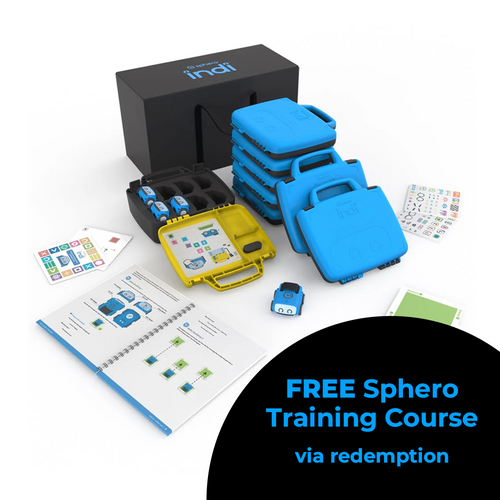
Receive a FREE online Professional Development (PD) Training Course (via redemption) with every purchase of a Sphero indi Class Pack - 8 robots (SKU 980-0532) made before 31st July 2025!
Sphero's 2-hour indi online self-guided professional development course offers insight into what makes this screenless robot for ages 4+ such a special, accessible robot and how it can be used to teach STEAM and computer science in any classroom. Learn more about the course content here.
On receipt of your Class Pack order, we will contact you with further information about redeeming your free Sphero training course.
Take your entire class on the road to STEAM with the indi Class Pack. The indi learning robot is designed to introduce early learners to the fundamentals of computational thinking, STEAM, and computer science principles while encouraging open-ended, imaginative play-based learning with real-life scenarios as students build custom mazes and solve puzzles.
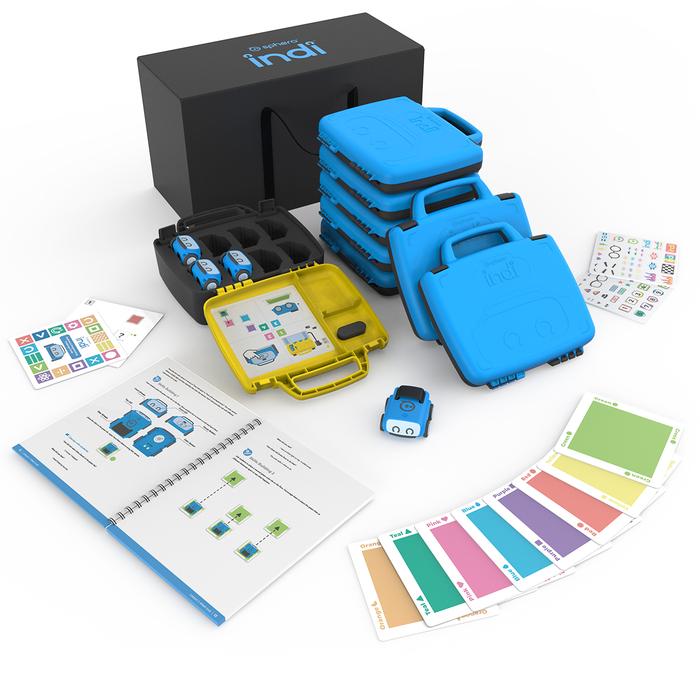
The Class Pack provides educators with all the resources and tools needed to get an entire class up and running: includes 8 indi robots, colour tiles, storage, a changing case, and standards-aligned lesson plans in our indi Educator Guide Book. indi offers an unplugged programming experience with an on-board colour sensor or students can kick their skills into high gear with more block coding options in the free Sphero Edu Jr app.
This Class Pack provides versatile and simple implementation tools and materials to get students started on their robotics journey. Ready to roll?
What's in the Box?
8 indi robots
8 durable student cases (for sending home with students or transporting indi)
1 classroom tote
1 charging case to charge and store 8 indi robots
8 charging cables
1 Educator Guide
160 durable silicone colour tiles (20 per student case)
8 sets of 15 Beginner’s Programming Challenge Cards (15 per student case)
2 sets of 30 replacement colour cards with adhesive tape sheets
2 decorative sticker sheets for students to customise indi


Sphero indi Educational Robot Student Kit
$244.55 ex GST
$254.54 ex GST
$254.54 ex GST
Rev up STEAM learning with the indi Student Kit— designed to engage 1-3 students at a time or to supplement additional indi learning robots and colour tiles for your indi Class Pack.
The indi learning robot is designed to introduce early learners to the fundamentals of computational thinking, STEAM, and computer science principles while encouraging open-ended, imaginative play-based learning with real-life scenarios as students build custom mazes and solve puzzles. indi offers an unplugged programming experience with an on-board colour sensor or students can kick their skills into high gear with more coding options in the free Sphero Edu Jr app.
What's in the box
1 indi robot
20 durable silicone colour tiles
1 student case
15 Beginner’s Programming Challenge Cards
1 quick start guide
2 decorative sticker sheets to customise indi
1 charging cable


Sphero indi Self-Guided Professional Development
$36.35 ex GST
Unlock the full potential of STEAM education in your classroom with the Sphero indi Self-Guided Professional Development course. This innovative online course is designed for educators looking to integrate computational thinking, literacy, and math development into their teaching through engaging, hands-on activities. Tailored for ages 4+, indi offers a screenless, exploratory learning experience that captivates and educates simultaneously.
Major Features:
Comprehensive Learning Modules: Dive into modules at your own pace, covering everything from basic operation to advanced programming with color instructions.
Hands-On STEAM Education: Engage young learners with activities that foster computational thinking, problem-solving, and collaboration.
Literacy and Math Integration: Discover practical classroom activities that use indi to support key educational outcomes.
Sphero Edu Jr App: Learn to use simplified drag-and-drop coding to enhance indi’s interaction with colors, making learning fun and interactive.
Professional Development Certificate: Complete the course to receive a certificate, showcasing your commitment to innovative teaching strategies.
FAQs
Q: What is included in my purchase?
A: You will receive 1x Activation Code to access the Self-Guided Course (robot sold separately).
Q: When will I receive my Activation Code?
A: Once we receive your order, we will email you an Activation Code within 3-5 business days.
Q: How long is the course?
A: The course duration is 2 hours.
Q: How long will I have access to the course?
A: Your course will be available for 90 days from the date you activate it.
Q: What will I receive on completion of the course?
A: You will receive a 2 Hour Personal Development Certificate. Sphero will email this to you on completion of the course.


Sphero Maze & Grid Code Mat
$272.72 ex GST
Elevate the learning and teaching experience with the Sphero Maze & Grid Code Mat, a versatile and innovative teaching tool designed to inspire and engage students in coding and problem-solving. Perfect for educational settings or at-home learning, this double-sided mat is your gateway to endless coding adventures and challenges.
Major Features:
Double-Sided Design: One side features an official competition field for BOLT/BOLT+ in The Sphero Global Challenge, offering a vast array of coding possibilities and integration into cross-curricular activities. The other side presents an intricate maze with multiple programming targets, promoting critical thinking and problem-solving skills.
Compatible with Sphero BOLT and BOLT+: Specifically designed to work seamlessly with Sphero BOLT and BOLT+ robots (sold separately), providing a hands-on experience in robotics and coding.
Educational and Fun: A perfect blend of education and entertainment, this mat encourages students to practice coding, strategize, and tackle new challenges, making it an ideal resource for classrooms, coding clubs, and home learning environments.
Durable and Classroom-Ready Size: Measuring 218 cm x 115 cm, the mat is built to withstand the energetic use of a classroom or home environment, ensuring long-term usability.
Purchase Orders Welcome: Simplifying the purchasing process for schools and educational institutions with a seamless Purchase Order option at checkout.
What’s included:
1 x double-sided, Sphero Maze & Code Mat (218 cm long x 115 cm wide)
This mat is compatible with Sphero BOLT and Sphero BOLT+ (sold separately)


Sphero Mini
$85.00 ex GST
$90.90 ex GST
$90.90 ex GST
Sphero Mini packs tons of fun into a tiny, app-enabled robot about the size of a ping pong ball. Drive Mini using different modes with the Sphero Mini app, or just by using your face. Yes, you read that right. Face Drive is a hilarious new feature that uses your facial expressions to drive the ball.
Mini’s games are just as addicting – use the ball as a controller to shoot your way through space, race a ship through a tunnel, or rotate your ball to destroy a polygon of bricks. Thanks to the beauty of app updates, there’s always more on the way. If you’re feeling extra clever, download the Sphero Edu app and program your robot using JavaScript.
Packed with teeny tiny tech, Sphero Mini has a little gyroscope, accelerometer, and LED lights. Colourful, interchangeable shells are available, so you can easily switch one out to suit your mood. With almost an hour of play time, Sphero Mini is the next big thing.
Features
Driving - Drive Mini using different modes with the Sphero Mini app – Joystick, Tilt, Slingshot, or Face Drive.
Face Drive™ - Face Drive is a hilarious new feature that uses your facial expressions to drive the ball.
Gaming - Sphero Mini can be used with the app as a video game controller. Play 3 games with more updates on the way.
Coding - Download the Sphero Edu app and program your Sphero Mini bot using JavaScript.
Interchangeable Shells - Colourful, interchangeable shells allow you to switch one out to suit your mood.
Drive Mode
Joystick - Tap and drag to drive Mini. The further you drag away from the center, the faster Mini goes.
Face Drive™ - Face Drive™ is a hilarious new feature that uses your facial expressions to drive the ball. Smile, frown, tilt your head left and right, and get weird with it. See how Mini moves with your expressions.
Tilt - Tilt your device up, down, and sideways to drive Mini. Tap and hold to pause.
Slingshot - Pull back on the drive “blob” to build speed. Release to launch your Mini forward.
Games
Exile II - Use Mini as a controller to move and shoot spaceships.
Lightspeed Drifter - Control a futuristic ship racing inside a tunnel with Mini.
Round Trip - Rotate Mini to destroy a polygon of "bricks" by bouncing a ball against them.
What's in the Box
Sphero Mini Robot
Micro USB Cord
3 Mini Traffic Cones
6 Mini Bowling Pins
Tech Specs
iOS 10 & Android 5.0 compatible
Interchangeable, removable plastic shell
Gyroscope & Accelerometer
LED Lights
Bluetooth connection (10 meter range)
Micro USB charging (almost 1 hour of play on a full charge)
Free App: Sphero Mini app available through iTunes or Google Play
Height: 42mm / Width: 42mm / Weight 46g
Top speed 1m/s
Charging time 1 hour


Sphero Mini Activity Kit
$148.14 ex GST
$163.63 ex GST
$163.63 ex GST
The Sphero Mini Activity Kit has everything you need to get rolling and playing. Each Kit comes with a Construction Set, Activity Cards, Pins, Cones and a Robotic Ball Cover. Follow the 15 STEM-inspired Activity Cards to build mazes, design obstacle courses, construct towers, play sports, and more. Complete all the challenges and games and then create your own fun – the possibilities are endless.
Download the Play app to explore driving modes or use the robot as a controller for arcade-style in-app games--test your skills as you dodge and destroy asteroids, race through a tunnel, or smash a polygon of bricks. Download the Sphero Edu app to dive into Draw, Blocks, and Text coding activities or create your own programs and then share them with the world. With so many ways to play, where will your imagination take you?
Sphero Mini Activity Kit Features
Clear shell - Now you can see the inner workings of your favourite teeny-tiny robot.
Fun-Filled - Each Kit comes with a Construction Set, Activity Cards, Bowling Pins, Traffic Cones and a Robotic Ball Cover.
Activity Cards - Includes 15 guided challenges and games to inspire your creativity and test your skills.
Construction Set - Rails, Arches, and Connector Pieces open up unlimited opportunities for creativity and play.
Drive - Drive Mini several ways with the Sphero Play app – Joystick, Tilt, Slingshot, or Kick drive.
Game - Play in-app games and use Sphero Mini as a joystick.
Code - Download the Sphero Edu app and program your robot 3 different ways.
Learn - Dive into the fundamentals of STEM with fun activities and programs.
What's in the box
1 robotic ball with a clear shell
15 Activity Cards
28-piece Construction Set
6 Bowling Pins,
3 Cones
Robotic Ball Cover
Micro USB Cable
Robot Tech Specs
Clear shell - See the tech inside
iOS 10 & Android 5.0 compatible
Gyroscope, Accelerometer, LED Light
Bluetooth Low Energy (BLE) connection (10 meter range)
Micro USB charging (1 hour charge for 45 minutes of play)
Height: 42mm / Width: 42mm / Weight 46g
Free App: Sphero Edu app compatible with iOS, Android, Kindle, Mac, Windows, and Chrome
Free App: Sphero Play app available on iTunes and Google Play
"


Sphero Mini Education 16 Pack (V2.0)
$2,272.72 ex GST
FREE Shipping on this productThe Sphero Mini Education Pack is now individualised and has everything you need to get rolling and learning! This new and improved pack includes 16 clear Sphero Mini app-enabled robotic balls, bumper covers, mini traffic cones, bowling pins, construction sets, and activity cards that help expand playtime and imagination in STEAM learning. Now enough accessories for easier to send home with students for individualized or hybrid learning!
TEENY TINY TECH
Packed with teeny tiny tech, Sphero Mini has a little gyroscope, accelerometer, and LED lights. With almost an hour of play time, your students will have the room to stretch their imagination—all while having fun learning!
Step-by-Step Learning
Learn the fundamentals of STEM and coding with mini traffic cones, bowling pins, construction sets, and step-by-step activity cards with STEM-inspired challenges and games.
Program Your Robot
The Sphero Edu app empowers anyone to program their Mini. Draw paths, use Scratch blocks, or write your own JavaScript text programs. Use actions, controls, operators, and more to give your bot the orders.
Sphero Edu provides a toolset unbounded in its potential.
Sphero Edu uses app-enabled robots to foster creativity through discovery and play, all while laying the foundation for computer science. Our program goes beyond code with collaborative STEAM activities, nurturing students’ imaginations in ways no other education program can. Sphero Edu is a cross-platform app, and is approachable for all skill levels, allowing us to reach as many minds as possible. Jump into Draw and Drive, advance to Block-based programming, and graduate to using JavaScript.
What's in the box
16 Sphero
16 Robotic ball covers
16 sets of 6 pins and 3 cones
16 construction sets
16 splitter USB cables
16 sets of 15 activity cards
1:1 Robots/Accessories/Activity Cards packaged together
Free Sphero Edu app available for download on iOS, Android, Kindle, Mac, Windows, and Chrome
Free Sphero Play app available for download on iOS and Android


Sphero Mini Soccer
$85.00 ex GST
$90.90 ex GST
$90.90 ex GST
Play with code. Score big with Sphero Mini Soccer
Sphero Mini Soccer squeezes stadium-sized fun into a tiny, app-enabled robotic ball. Packed with impressive tech, Sphero Mini Soccer has a gyroscope, accelerometer, and customisable LED lights. Download the Sphero Play app, cue up Kick Drive mode and send your robot rolling with the flick of a finger. You can also tap to trap the ball or add a spin to your kick for a little extra flare.
Use the eight included cones to set up a goal, practice your ball-handling skills or challenge a friend to a game. Use Mini Soccer as a controller to play in-app arcade-style games--dodge and destroy asteroids, race through a tunnel, or smash a polygon of bricks. Download the Sphero Edu app to kick off your coding journey, explore activities, and share your creations with the community. Sphero Mini Soccer is the perfect way for fans of all ages to get their kicks.
Sphero Mini Soccer Highlights
Exclusive soccer shell - get your kicks with this soccer-themed robot.
Kick it - cue up Kick Drive mode in the Sphero Play app to flick, spin, and score big.
Accessorise - arrange the eight included cones to practice your penalty kicks and show off your ball-handling skills.
Drive - control Mini several ways with the Sphero Play app – Joystick, Tilt, Slingshot, Kick Drive, and Scream Drive.
Game - Use Soccer Mini as a joystick and play arcade-style in-app games.
Code - Download the Sphero Edu app and program your Sphero Soccer bot with Draw, Blocks or Text.
Purchase Orders Welcome
Schools and Educational Institutions we offer a Purchase Order option at checkout, ensuring a seamless purchasing process.First-Class Support
We offer exceptional support for our educational products, backed by our firsthand experience as former teachers.Australian Warehouses
Experience efficient and timely delivery as our store ships directly from our suppliers' warehouses in Australia.Australian Owned
Shop with confidence knowing that we are proudly Australian owned, delivering quality products with a touch of true Aussie spirit.