




Adonit Neo — Magnetic Active Stylus
from $72.72 ex GST
($79.99 inc GST)
Magnetic active styluses that clip to the side of a tablet the way an Apple Pencil does — which is the single biggest factor in whether a stylus is still with the device at the end of term.
Choose your platform:
Neo — for iPad. Magnetically attaches to the side of compatible models.
Neo Ink — for Windows devices including Surface, using Microsoft Pen Protocol.
Why magnetic attachment matters in a school. A stylus in a pencil case gets lost; a stylus stuck to the tablet comes back with the tablet. If you're issuing styluses with a class set, this is the feature that determines how many you're replacing next year.
Check compatibility before ordering — Neo works with iPad models that support side attachment, and Neo Ink needs a Windows device with pen support. Purchase orders accepted on school accounts.


Adonit Precision Stylus — SE 2 & Pro 4
$54.54 ex GST
($59.99 inc GST)
Two precision styluses that need no battery, no pairing and no charging — which for a shared class set is the whole argument. Nothing to go flat, nothing to configure, works the moment a student picks it up.
Choose your model:
SE 2 — the newer design, in black or white
Pro 4 — the precision disc model, in black or silver
Where these fit: annotation, maths working, diagrams and drawing on any touchscreen. Both work across iPad, Android and Windows, so a mixed fleet doesn't need two products.
Passive or active? Passive styluses like these are cheaper, need no charging and never stop working mid-lesson. Active styluses such as the Dash 4 and Neo give a finer line and a more natural feel, at roughly twice the price and with a battery to keep charged. For a class set, passive usually wins.
Purchase orders accepted on school accounts.

Twelve South HoverBar Duo — Adjustable iPad Arm
$127.26 ex GST
($139.99 inc GST)
An adjustable arm that holds an iPad wherever you need it — over a desk, beside a monitor, or angled down at a workbench. The arm is the point: a normal stand puts a tablet in one position, this puts it anywhere.
What it does:
Weighted base with an adjustable arm
Holds an iPad at almost any height and angle
Black or white
Where it earns its place in a school:
As a visualiser — angle an iPad down over a desk to show worked examples on the board
Recording demonstrations — science, art, food technology and maker work filmed from overhead
Stop-motion animation — a stable overhead position is exactly what the task needs
Accessibility — positioning a screen for a student who can't hold a device
Cheaper than a dedicated document camera if you already have iPads, and does more with them. Purchase orders accepted on school accounts.


Satechi OntheGo — Bluetooth Keyboard with Stand
$136.35 ex GST
($149.99 inc GST)
A compact Bluetooth keyboard with a built-in stand, made to travel with a tablet. The stand is the point — it holds an iPad at a working angle without a separate accessory, so the whole setup is two items instead of three.
What it does:
Compact Bluetooth keyboard with integrated device stand
Folds down for carrying
Black or sand
Where it fits in a school: a teacher using an iPad as a working laptop, senior students doing extended writing on tablets, and any situation where a full keyboard-case is more bulk than you want on a shared device.
Pairs with the OntheGo Mouse for a complete portable setup. Purchase orders accepted on school accounts.

Paperlike Pencil Tips — 4 Pack
$27.26 ex GST
($29.99 inc GST)
Replacement tips for Apple Pencil, designed to last longer on a matte screen protector. A Paperlike surface has more friction than bare glass, which is the point — but it wears a standard pencil tip faster, and a worn tip skips and scratches.
What's included:
Four replacement pencil tips
Worth holding a pack per classroom if students use Apple Pencils daily. A worn tip is the most common reason a stylus “stops working”, and it's a thirty-second fix once you have the spares on hand. Class quantities available on a school purchase order.


Paperlike 3 — iPad Screen Protector
$59.08 ex GST
($64.99 inc GST)
A matte screen protector that gives an iPad the friction of paper under a stylus. Glass is slippery, and students writing on it press harder and form letters worse than they do on paper — Paperlike puts the drag back, which is why handwriting, annotation and drawing tasks feel natural on it.
What it does:
Matte surface with paper-like resistance for stylus work
Cuts glare from overhead classroom lighting
Protects the screen from scratches in daily shared use
Where it earns its place:
Handwriting practice and letter formation in primary
Maths working, diagrams and annotation across year levels
Art, design and technical drawing
Marking and feedback on staff iPads
Choose your iPad model carefully. These are cut to fit a specific generation — an iPad 10.2" protector won't fit an iPad Air 11". If you're unsure which model your fleet runs, check Settings, General, About on one device and tell us what it says.
Worth pairing with a rugged case and a stylus for a complete one-to-one rollout. Class quantities available on a school purchase order.

Shintaro Capacitive Touch Stylus
$13.59 ex GST
($14.95 inc GST)
A capacitive touch stylus for iPads and tablets — the cheap, no-battery kind that works on any touchscreen and doesn't need pairing, charging or a firmware update. For handwriting, annotation and drawing tasks in a class set, this is usually all a school needs.
What it is:
Capacitive stylus, 105mm long
Built-in clip
Works with iPad, iPhone, Samsung Galaxy and other tablets
Why schools buy these over an Apple Pencil: nothing to charge, nothing to pair, nothing to lose from a rechargeable fleet, and at this price a lost one is replaced rather than investigated. For pressure sensitivity and palm rejection you still want an active stylus — for everything else, this does the job.
Pairs with our Gumdrop stylus pen holder, which sticks to a rugged case and keeps the stylus with the device. Class quantities available on a school purchase order.

Gumdrop Stylus Pen Holder — Adhesive Loop
$13.59 ex GST
($14.95 inc GST)
An adhesive stylus loop that sticks to a Gumdrop rugged case, so the stylus travels with the device instead of ending up in a drawer. Cheap enough to fit every case in a class set, and it removes the most common reason a stylus goes missing.
What's included:
Adhesive-backed pen holder
Elastic loop sized for a standard device stylus
Sticks to Gumdrop rugged cases. Worth adding to any iPad rollout where students are issued a stylus — replacing lost styluses costs far more over a year than fitting these once. Class quantities available on a school purchase order.


Gumdrop FoamTech — Rugged iPad Case with Handle
$72.68 ex GST
($79.95 inc GST)
A lightweight foam iPad case made for primary classrooms, with a handle a child can actually hold. The handle folds flat to prop the iPad up for viewing or angle it for typing, so one case covers carrying, watching and working.
What it does:
Fold-out handle doubling as a viewing and typing stand
Window cut-out in the back for asset tagging
Full access to ports, buttons, camera and speakers
Third-party TechShell certification for drops up to four feet
Choose your iPad:
11-inch — iPad 10th and 11th generation
10.2-inch — earlier iPad generations
The lightest of the three Gumdrop iPad cases and the easiest for small hands. Class quantities available on a school purchase order.

Gumdrop DropTech Clear — iPad Case
$72.68 ex GST
($79.95 inc GST)
A clear rugged case for iPad, built around the part of a rollout that usually goes wrong — fitting 300 of them. The updated design installs in seconds with far less handling per unit, which is the difference between a deployment that takes an afternoon and one that takes a week.
What it does:
Clear back panel, so the iPad's own design shows through and asset tags stay readable
Simplified installation built for large-scale rollouts
DropTech protection for daily student handling
Fits: iPad 11-inch (A16), iPad 10th generation and iPad 11th generation.
Choose DropTech Clear if you're deploying at scale and want asset tags visible through the back. Choose the Hideaway if students need a built-in stand, or FoamTech if you want a carry handle for younger classes. Class quantities available on a school purchase order.

Gumdrop Hideaway — Rugged iPad Case with Stand
$72.68 ex GST
($79.95 inc GST)
A rugged iPad case with a kickstand that disappears when it isn't needed. The magnetised stand folds flat into the silicone back and clips out with one movement, so there's no loose flap to snap off in a school bag — the usual failure point on a stand case.
What it does:
Built-in hide-away kickstand, magnetised and shockproof
Protective screen cover against liquids, dust and dirt
Rubberised bumpers with reinforced corners for shock absorption
Drop tested to four feet, exceeding military drop-test standards
Fits: iPad 10th and 11th generation.
Choose the Hideaway if students need to stand the iPad up for reading or video without a separate stand. Class quantities available on a school purchase order.


Satechi Stand Hub — iPad Pro & Tablets
$163.63 ex GST
($179.99 inc GST)
A stand for iPad Pro and larger tablets with a hub built into the base — it holds the tablet at a working angle and adds the ports an iPad doesn't have.
What it does:
Aluminium stand holding an iPad Pro or similar tablet upright
Built-in hub adding HDMI, USB and card reader
Charges the tablet through the same connection
Where it earns its place: an iPad being used as a working machine rather than a handheld one — senior media work, a front-desk terminal, or a teacher station where the tablet drives a display and takes a keyboard.
Pairs with a Slim X1 or OntheGo keyboard for a full desktop setup on a tablet. Purchase orders accepted on school accounts.


Adonit Dash 4 — Active Stylus
$109.08 ex GST
($119.99 inc GST)
An active stylus with a 1.9mm fine tip, rechargeable and pressure-free — it draws a consistent line regardless of how hard a student presses. For handwriting and sketching where a rubber-tipped passive stylus feels vague, this is the step up.
What it does:
Fine 1.9mm active tip
Rechargeable, no batteries to replace
Works across iPad, Android and Windows touchscreens
Black or silver
Where it fits: senior art and design, note-taking on tablets, and annotation work where precision matters. Replacement nibs and chargers are available separately — worth stocking both if you're issuing a class set.
Not an Apple Pencil. No pressure sensitivity or palm rejection, which the Pencil has and this doesn't. It works across every platform, though, and costs a third as much.
Purchase orders accepted on school accounts.

Adonit Replacement Nibs — 3 Pack
$22.72 ex GST
($24.99 inc GST)
Replacement nibs for the Adonit Dash 4 and AI-Vocal, three per pack. Nibs wear down with use — a worn nib skips, drags and eventually scratches, and replacing it costs a fraction of replacing the stylus.
What's included: three replacement nibs.
Worth stocking alongside a class set. A worn nib is the most common reason a student reports a stylus has stopped working, and it's a thirty-second fix if you have spares on hand.
Purchase orders accepted on school accounts.


Adonit Dash 4 — Replacement USB Charger
$27.26 ex GST
($29.99 inc GST)
The replacement USB charging cable for the Adonit Dash 4. A proprietary magnetic connector, so a standard USB cable won't do the job — worth holding a spare if you run a class set.
Fits: Adonit Dash 4 only.
Purchase orders accepted on school accounts.


Satechi USB-C to Lightning Short Cable — 25cm
$31.81 ex GST
($34.99 inc GST)
A 25cm USB-C to Lightning cable for older iPads and iPhones still in service. Short, for charging stations and hubs where the device sits right beside the port.
What it does:
USB-C to Lightning, 25cm
Braided construction with aluminium housings
Which iPads need Lightning? iPads up to the 9th generation and iPad Mini up to the 5th. From the 10th generation onward Apple moved to USB-C, so newer fleets want the USB-C cable instead.
Purchase orders accepted on school accounts.
Satechi Slim X1 — Compact Bluetooth Keyboard
$99.99 ex GST
($109.99 inc GST)
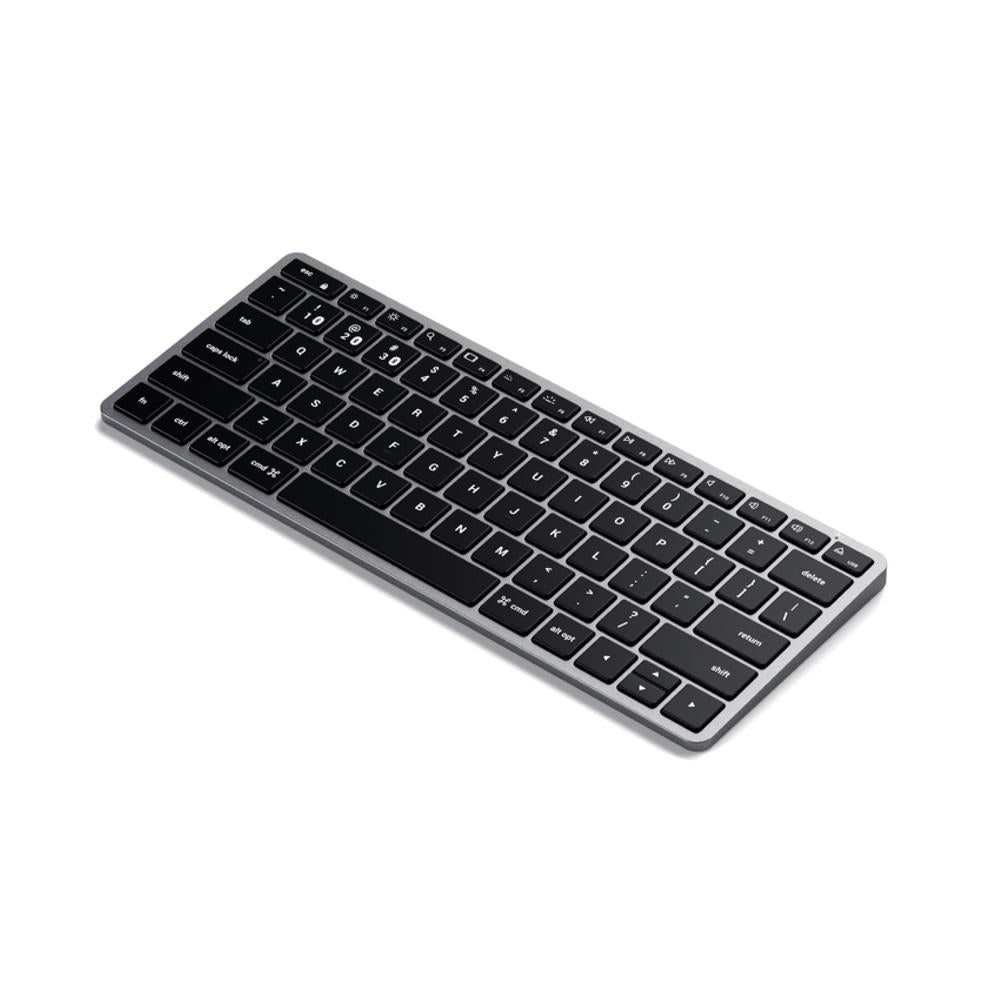
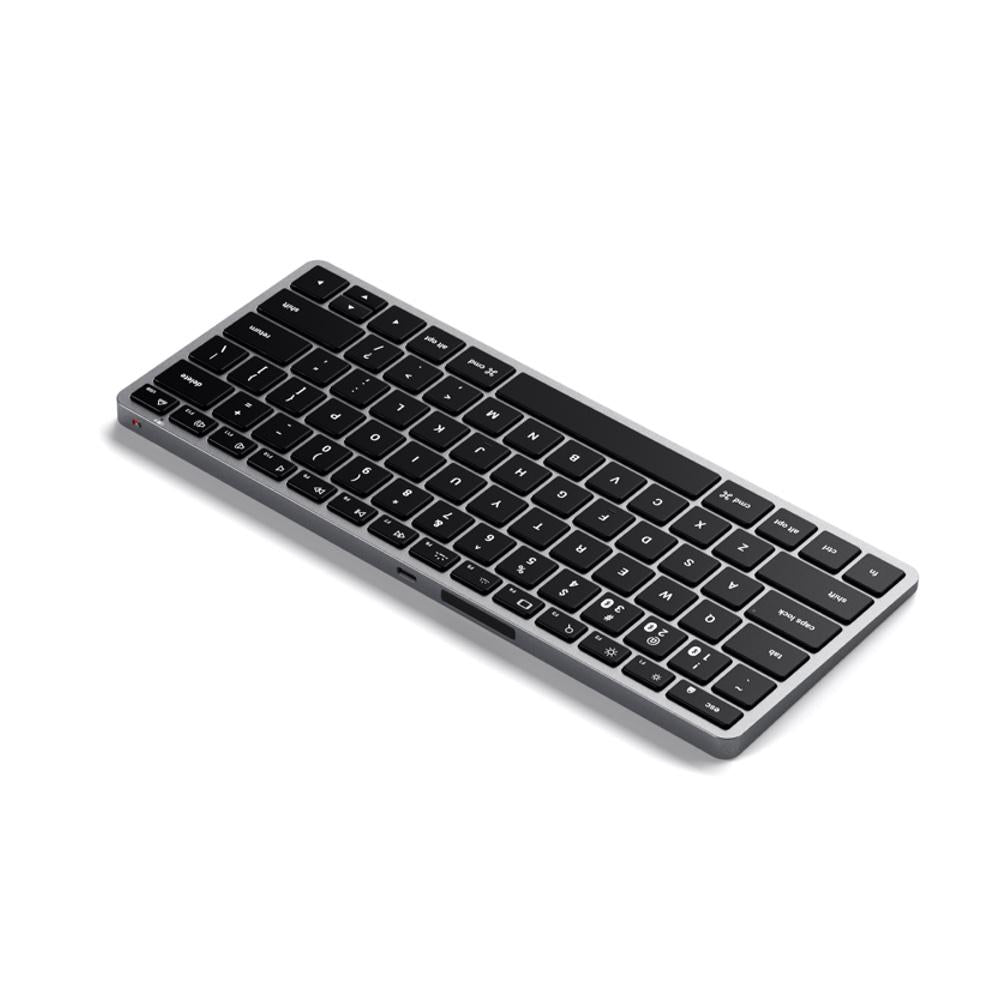
The most compact keyboard in the Slim range — a full QWERTY layout with no numeric keypad, which makes it small enough to sit in front of an iPad on a desk or slide into a bag with a laptop.
What it does:
Compact tenkeyless layout
Pairs with up to three devices, switching by dedicated key
Backlit keys with 10 adjustable brightness levels
Rechargeable over USB-C
Slim aluminium body with macOS function keys
Where it fits in a school: paired with an iPad for extended writing, or on a staff desk where space is tight. The three-device pairing suits a teacher moving between an iPad, a laptop and a desktop.
Windows note: works with Windows 10 and later. Not supported on Windows 7 or 8.
Need a number pad? The Slim X2 adds one and stays reasonably compact; the Slim X3 is full-size. Purchase orders accepted on school accounts.
Bonelk Universal Keyboard Folio — 9–11" Tablets
$81.81 ex GST
($89.99 inc GST)
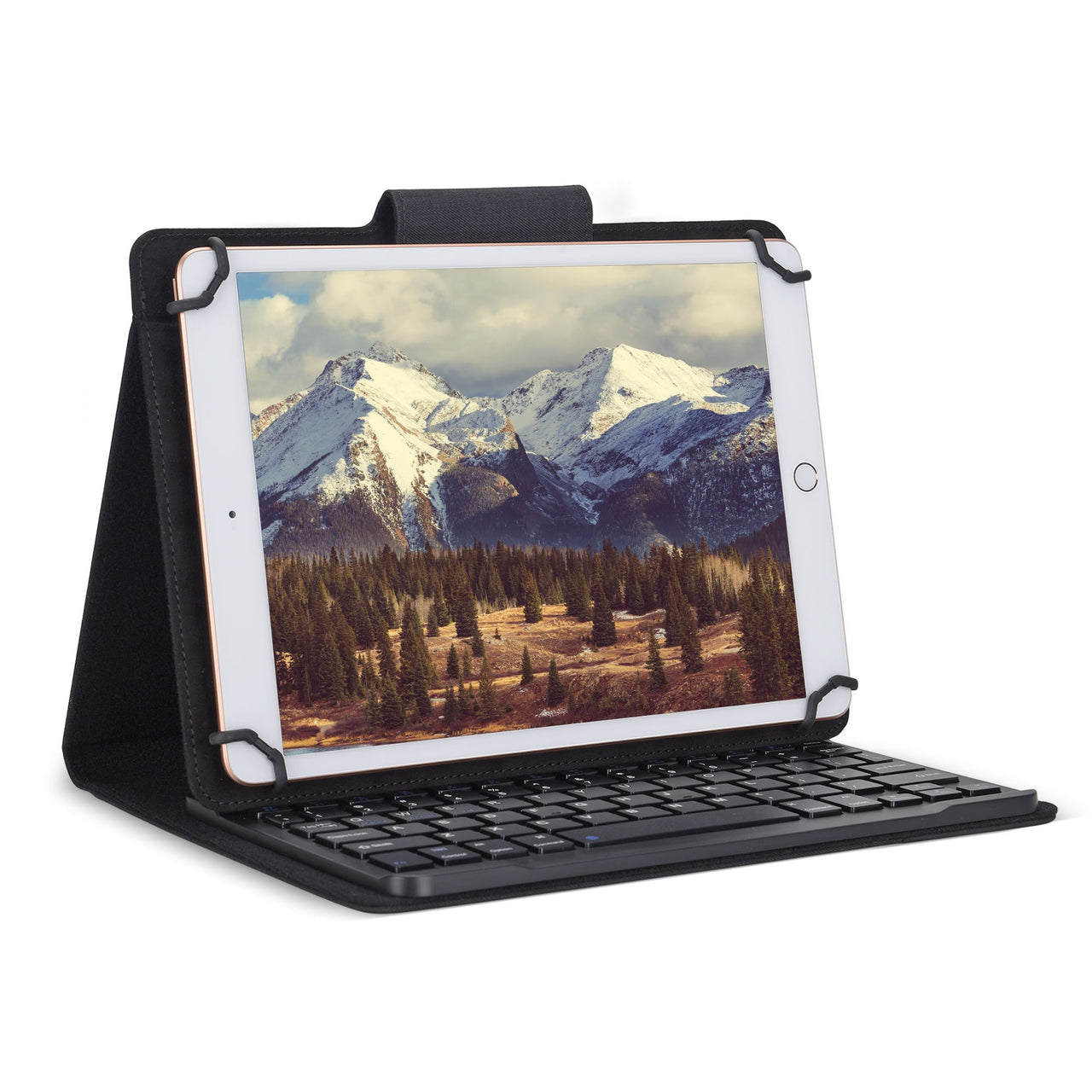
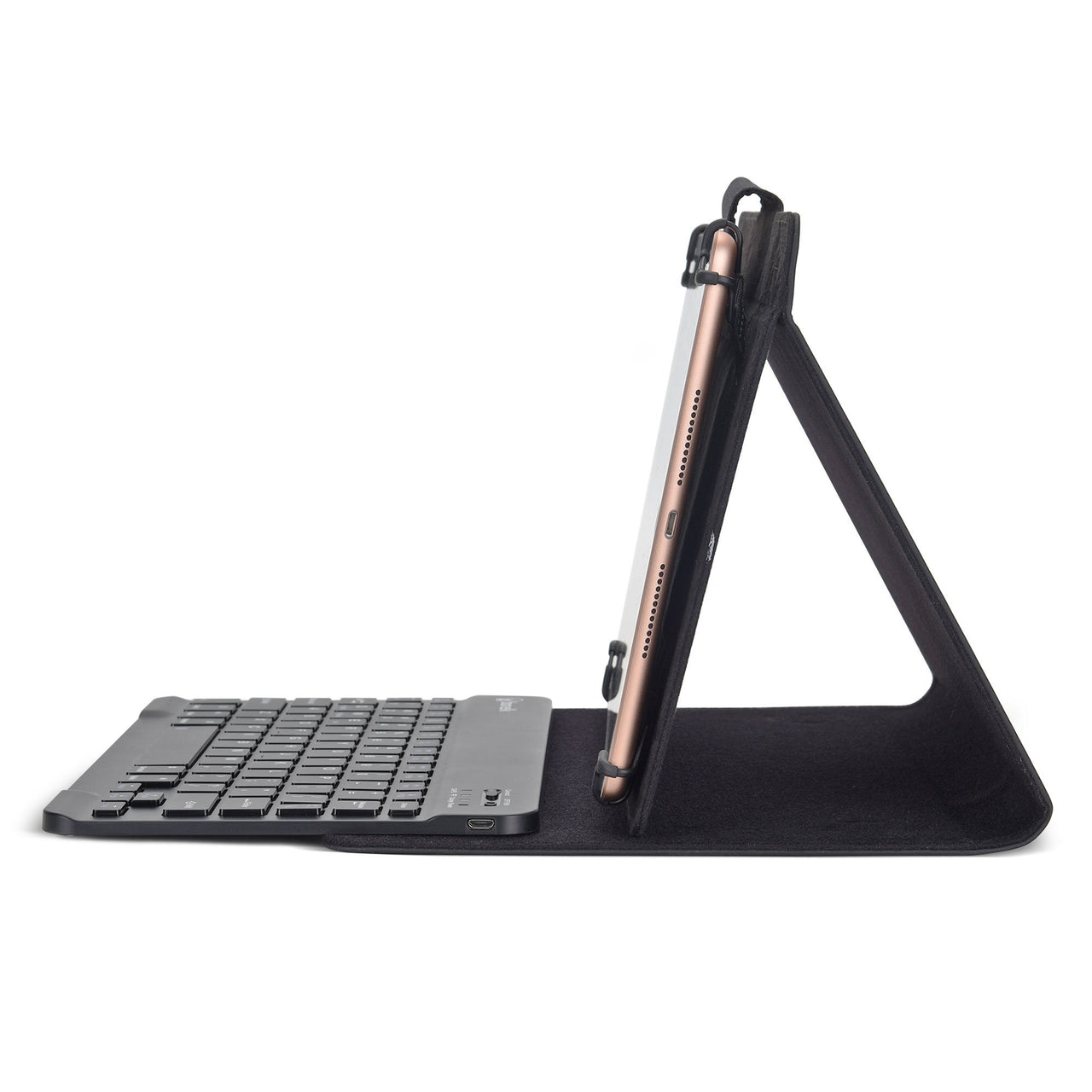
A folio case with a detachable Bluetooth keyboard, for 9 to 11 inch tablets. Turns an iPad into something a student can write an essay on — which is the difference between a tablet used for consuming and one used for producing.
What it does:
Fits tablets from 9 to 11 inches
Bluetooth keyboard built into the folio
Folds back as a viewing stand when the keyboard isn't needed
Protective cover for the screen in transit
Where it earns its place: senior English and humanities, extended writing tasks, and any assessment where students type rather than handwrite. Also worth considering for students with handwriting difficulties.
Class quantities available on a school purchase order.


Bonelk Universal Sleeve — 11" Tablets
$31.81 ex GST
($34.99 inc GST)
A padded slip sleeve for 11 inch tablets — the simplest protection there is, and the one students will actually use because there's nothing to fasten or fold.
What it does:
Fits tablets up to 11 inches
Padded slip-in construction
Slim enough to go inside an existing school bag
Sleeve or case? A sleeve protects in transit but comes off in use; a folio stays on. For a trolley set that lives in the classroom, a sleeve is often enough and costs less. For a take-home program, a folio protects the device while it's being used.
Class quantities available on a school purchase order.


Bonelk Universal Folio Case — 9–11" Tablets
$45.45 ex GST
($50.00 inc GST)
A universal folio case for 9 to 11 inch tablets — one case that fits most of the iPads and Android tablets a school runs, rather than a model-specific shell you replace at every device refresh.
What it does:
Fits tablets from 9 to 11 inches
Folio cover protecting the screen in a bag
Folds back as a viewing stand
Universal or model-specific? A universal folio survives a device upgrade and suits a mixed fleet. A moulded case like the Gumdrop range fits one generation exactly and gives better drop protection. For a shared trolley set that turns over every few years, universal usually wins.
Class quantities available on a school purchase order.


Adonit Mark — Passive Stylus
$27.26 ex GST
($29.99 inc GST)
The simplest stylus Adonit make — a rubber-tipped passive stylus that works on any touchscreen with no battery, no pairing and no charging. At this price it's the one to buy in quantity.
What it does:
Rubber tip, works on any capacitive touchscreen
No battery or pairing
Aluminium body with a clip
Black or silver
Where it fits: early years and primary classrooms, where the job is pointing, drawing and tapping rather than fine handwriting. Sturdy enough for shared use and cheap enough to replace.
Want more precision? The Mini 4 and Pro 4 use a clear disc tip you can see through, and the Dash 4 has a fine active tip. Purchase orders accepted on school accounts.


Adonit Mini 4 — Precision Stylus
$36.35 ex GST
($39.99 inc GST)
A compact precision stylus with a clear disc tip — you see through the disc to exactly where the line will land, which is the difference between guessing and drawing accurately.
What it does:
Clear precision disc tip
No battery or pairing required
Compact body with a clip
Blue or grey
Where it fits: maths working, diagrams, annotation and drawing tasks where a rubber tip is too blunt. The disc tip is a replaceable part — spares are available.
Purchase orders accepted on school accounts.


Adonit Replacement Disc Tips — 2 Pack
$25.45 ex GST
($28.00 inc GST)
Replacement clear disc tips for the Adonit Mini 4, Pro 3 and Pro 4. The disc is the part that wears — it's what lets you see exactly where the line lands, and a worn one skips and drags.
What's included: two replacement disc tips.
Worth stocking for a class set. Disc tips are the most-replaced part on a precision stylus, and a worn tip is the usual reason a student says the stylus has stopped working.
Purchase orders accepted on school accounts.


Satechi USB-C Mobile Pro Hub
$81.81 ex GST
($89.99 inc GST)
A compact travel hub adding HDMI, USB and a headphone jack to a laptop or tablet. Small enough to live in a bag, which matters more than port count for a teacher who moves between rooms.
What it does:
HDMI output for classroom displays and projectors
USB ports for peripherals
3.5mm headphone jack — useful on devices that have dropped it
Silver or space grey
Where it fits: a teacher laptop or an iPad used for presenting. The headphone jack is the detail worth noting — it means a wired headset still works on a device with only USB-C.
Purchase orders accepted on school accounts.


