


Sphero Terrain Park
$40.90 ex GST
($44.99 inc GST)
Elevate your robotic adventures with the Sphero Terrain Park! Designed for thrill-seekers and aspiring engineers alike, this customisable set lets you ramp, roll, and ride the rails through five challenging configurations. Whether you're at home or school, the Sphero Terrain Park is the ultimate playground for your robotic ball, putting your skills to the ultimate test.
Major Features:
Five Configurable Challenges: Craft your course with two ramps, a set of rails, and five dynamic configurations for non-stop action.
Durable and High-Quality Materials: Built to last, the Sphero Terrain Park is made with materials that withstand every flip, roll, and crash.
Supports STEM Learning: A perfect blend of fun and education, encouraging problem-solving and creativity in areas of science, technology, engineering, and mathematics.
Easily Customised: Compatible with Sphero BOLT+, Sphero BOLT, and Sphero SPRK+ robotic balls, easily controlled via Android and iOS apps for endless possibilities.
First-Class Support and Australian Pride: Backed by exceptional support from former teachers and proud Australian ownership, ensuring a seamless experience from purchase to play.


Sphero Chariot
$40.90 ex GST
($44.99 inc GST)
Unleash Your Creativity with the Sphero Chariot!
Elevate the fun and excitement with the Sphero Chariot, an innovative accessory designed specifically for your round robots like BOLT+/BOLT and SPRK+. However, it's not just a simple chariot; it's a gateway to endless creativity and adventures, from carrying cargo and designing custom creations with toy building bricks to transforming into the ultimate spy-bot. This chariot is perfect for those looking to add another level of interaction and ingenuity to their Sphero experience.
Key Features:
Enhanced Creativity: Snap on toy building bricks to design your unique moving creations, adding another layer of fun and innovation.
Ultimate Spy-Bot: Add a phone to the custom carrier and turn your Sphero into a sneaky spy-bot for adventurous missions.
Chariot Races: Battle your friends in high-speed chariot races for ultimate bragging rights.
Cargo Carrier: Utilise the chariot to carry cargo, whether it's delivering a note or transporting small items.
Educational Fun: Ideal for schools and educational institutions, with purchase orders welcome and first-class support guaranteed.
NOTE: The chariot is ideal for round robots like BOLT+/BOLT and SPRK+, but not Sphero Mini.
* Lego not included


Sphero Mini
$85.00 ex GST
$90.90 ex GST ($93.50 inc GST)
$90.90 ex GST ($93.50 inc GST)
Sphero Mini packs tons of fun into a tiny, app-enabled robot about the size of a ping pong ball. Drive Mini using different modes with the Sphero Mini app, or just by using your face. Yes, you read that right. Face Drive is a hilarious new feature that uses your facial expressions to drive the ball.
Mini’s games are just as addicting – use the ball as a controller to shoot your way through space, race a ship through a tunnel, or rotate your ball to destroy a polygon of bricks. Thanks to the beauty of app updates, there’s always more on the way. If you’re feeling extra clever, download the Sphero Edu app and program your robot using JavaScript.
Packed with teeny tiny tech, Sphero Mini has a little gyroscope, accelerometer, and LED lights. Colourful, interchangeable shells are available, so you can easily switch one out to suit your mood. With almost an hour of play time, Sphero Mini is the next big thing.
Features
Driving - Drive Mini using different modes with the Sphero Mini app – Joystick, Tilt, Slingshot, or Face Drive.
Face Drive™ - Face Drive is a hilarious new feature that uses your facial expressions to drive the ball.
Gaming - Sphero Mini can be used with the app as a video game controller. Play 3 games with more updates on the way.
Coding - Download the Sphero Edu app and program your Sphero Mini bot using JavaScript.
Interchangeable Shells - Colourful, interchangeable shells allow you to switch one out to suit your mood.
Drive Mode
Joystick - Tap and drag to drive Mini. The further you drag away from the center, the faster Mini goes.
Face Drive™ - Face Drive™ is a hilarious new feature that uses your facial expressions to drive the ball. Smile, frown, tilt your head left and right, and get weird with it. See how Mini moves with your expressions.
Tilt - Tilt your device up, down, and sideways to drive Mini. Tap and hold to pause.
Slingshot - Pull back on the drive “blob” to build speed. Release to launch your Mini forward.
Games
Exile II - Use Mini as a controller to move and shoot spaceships.
Lightspeed Drifter - Control a futuristic ship racing inside a tunnel with Mini.
Round Trip - Rotate Mini to destroy a polygon of "bricks" by bouncing a ball against them.
What's in the Box
Sphero Mini Robot
Micro USB Cord
3 Mini Traffic Cones
6 Mini Bowling Pins
Tech Specs
iOS 10 & Android 5.0 compatible
Interchangeable, removable plastic shell
Gyroscope & Accelerometer
LED Lights
Bluetooth connection (10 meter range)
Micro USB charging (almost 1 hour of play on a full charge)
Free App: Sphero Mini app available through iTunes or Google Play
Height: 42mm / Width: 42mm / Weight 46g
Top speed 1m/s
Charging time 1 hour


Sphero BOLT
$272.72 ex GST
$363.63 ex GST ($299.99 inc GST)
$363.63 ex GST ($299.99 inc GST)
Sphero BOLT is an app-enabled robotic ball that provides endless opportunities to be creative and have fun while learning. Program with the Sphero Edu app from nearly any mobile or desktop device, discover awesome community-created activities, or just drive and play. BOLT was built to shine with a brilliant 8x8 LED Matrix that animates and displays real-time data. Create and customise games and learn to code by drawing on your screen, using Scratch blocks, or writing JavaScript text programs.
Use advanced sensors to keep tabs on BOLT's speed, acceleration, and direction, or orient and drive BOLT with the built-in compass. BOLT also features infrared communication, allowing your robot to communicate with other BOLTs, enabling brand new games and advanced coding tactics. Equipped with Bluetooth SMART and a durable, waterproof shell, Sphero BOLT establishes a striking new way to learn and play.
For a classroom set of Sphero BOLT check out our Sphero BOLT 15 Pack or for a perfect plug and play solution for your classroom take a look at the Sphero BOLT Power Pack.
Highlights
An app-enabled robotic ball that provides endless opportunities to be creative and have fun while learning
Learn to code by drawing, using Scratch blocks, or writing JavaScript text with the Sphero Edu app
Programmable 8x8 LED Matrix that animates and displays real-time data
BOLT to BOLT infrared communication allows for new games and advanced movements like swarming
Auto-aim your robot thanks to the built-in compass
Durable UV-coated clear plastic shell
Bluetooth Smart connection (up to 30 m range)
Long battery life 2+ hours per charge (Inductive charging)
Take BOLT for a spin, simply drive and play games
Compatible with iOS, Android, Kindle, Mac, Windows, Chrome
What's in the box
Sphero BOLT
Inductive Charging Base
USB to Micro-USB charging cable
Protractor with heading, directions, and clock
Sticker sheet
Quick Start Guide


Sphero BOLT Power Pack
$4,726.36 ex GST
$4,999.00 ex GST ($5,199.00 inc GST)
$4,999.00 ex GST ($5,199.00 inc GST)
Plug in. Power up. Roll out. Includes FREE shipping.
The Sphero BOLT Power Pack lets you charge, store, and carry Sphero BOLT robots... times 15. Built with an integrated cooling system, your robots can charge safely all from one place. FREE Shipping to anywhere in Australia!
With more robots, a longer battery life (2+ hours), auto-aiming, and more, the BOLT Power Pack is the top of the line kit for educators using the Sphero Edu program in a classroom, robotics club, or in any maker environment you can dream up. Plus it's loaded with Turbo Covers, maze tape, and protractors, so the activities can get started anytime, anywhere. Tote it all like a boss in a sleek airline compliant carrying case on rollers with a retractable handle. You'll officially be the best teacher ever.
Highlights
Learn to code by drawing, using Scratch blocks, or writing JavaScript text with the Sphero Edu app.
Sphero BOLT was built to shine with a programmable 8x8 LED Matrix that animates and displays real-time data.
BOLT to BOLT infrared communication allows for new games and advanced movements like swarming.
Auto aim your robot thanks to the built-in compass.
A long battery life of 2 hours per charge can handle even your biggest projects.
It’s fun to take for a spin. Simply drive BOLT and play games.
BOLT is approachable yet advanced with more features, more power, and more fun.
What's in the box
15 x Sphero BOLT
Charging Case and Power Adapter
15 x Clear Turbo Covers
15 x Maze Tape and Protractors with heading, directions, and clock
Classroom Posters and Stickers


Sphero Mini Soccer
$85.00 ex GST
$90.90 ex GST ($93.50 inc GST)
$90.90 ex GST ($93.50 inc GST)
Play with code. Score big with Sphero Mini Soccer
Sphero Mini Soccer squeezes stadium-sized fun into a tiny, app-enabled robotic ball. Packed with impressive tech, Sphero Mini Soccer has a gyroscope, accelerometer, and customisable LED lights. Download the Sphero Play app, cue up Kick Drive mode and send your robot rolling with the flick of a finger. You can also tap to trap the ball or add a spin to your kick for a little extra flare.
Use the eight included cones to set up a goal, practice your ball-handling skills or challenge a friend to a game. Use Mini Soccer as a controller to play in-app arcade-style games--dodge and destroy asteroids, race through a tunnel, or smash a polygon of bricks. Download the Sphero Edu app to kick off your coding journey, explore activities, and share your creations with the community. Sphero Mini Soccer is the perfect way for fans of all ages to get their kicks.
Sphero Mini Soccer Highlights
Exclusive soccer shell - get your kicks with this soccer-themed robot.
Kick it - cue up Kick Drive mode in the Sphero Play app to flick, spin, and score big.
Accessorise - arrange the eight included cones to practice your penalty kicks and show off your ball-handling skills.
Drive - control Mini several ways with the Sphero Play app – Joystick, Tilt, Slingshot, Kick Drive, and Scream Drive.
Game - Use Soccer Mini as a joystick and play arcade-style in-app games.
Code - Download the Sphero Edu app and program your Sphero Soccer bot with Draw, Blocks or Text.


Sphero Mini Activity Kit
$148.14 ex GST
$163.63 ex GST ($162.95 inc GST)
$163.63 ex GST ($162.95 inc GST)
The Sphero Mini Activity Kit has everything you need to get rolling and playing. Each Kit comes with a Construction Set, Activity Cards, Pins, Cones and a Robotic Ball Cover. Follow the 15 STEM-inspired Activity Cards to build mazes, design obstacle courses, construct towers, play sports, and more. Complete all the challenges and games and then create your own fun – the possibilities are endless.
Download the Play app to explore driving modes or use the robot as a controller for arcade-style in-app games--test your skills as you dodge and destroy asteroids, race through a tunnel, or smash a polygon of bricks. Download the Sphero Edu app to dive into Draw, Blocks, and Text coding activities or create your own programs and then share them with the world. With so many ways to play, where will your imagination take you?
Sphero Mini Activity Kit Features
Clear shell - Now you can see the inner workings of your favourite teeny-tiny robot.
Fun-Filled - Each Kit comes with a Construction Set, Activity Cards, Bowling Pins, Traffic Cones and a Robotic Ball Cover.
Activity Cards - Includes 15 guided challenges and games to inspire your creativity and test your skills.
Construction Set - Rails, Arches, and Connector Pieces open up unlimited opportunities for creativity and play.
Drive - Drive Mini several ways with the Sphero Play app – Joystick, Tilt, Slingshot, or Kick drive.
Game - Play in-app games and use Sphero Mini as a joystick.
Code - Download the Sphero Edu app and program your robot 3 different ways.
Learn - Dive into the fundamentals of STEM with fun activities and programs.
What's in the box
1 robotic ball with a clear shell
15 Activity Cards
28-piece Construction Set
6 Bowling Pins,
3 Cones
Robotic Ball Cover
Micro USB Cable
Robot Tech Specs
Clear shell - See the tech inside
iOS 10 & Android 5.0 compatible
Gyroscope, Accelerometer, LED Light
Bluetooth Low Energy (BLE) connection (10 meter range)
Micro USB charging (1 hour charge for 45 minutes of play)
Height: 42mm / Width: 42mm / Weight 46g
Free App: Sphero Edu app compatible with iOS, Android, Kindle, Mac, Windows, and Chrome
Free App: Sphero Play app available on iTunes and Google Play
"
Sphero RVR+ Programmable Robot
$435.45 ex GST
$454.54 ex GST ($479.00 inc GST)
$454.54 ex GST ($479.00 inc GST)
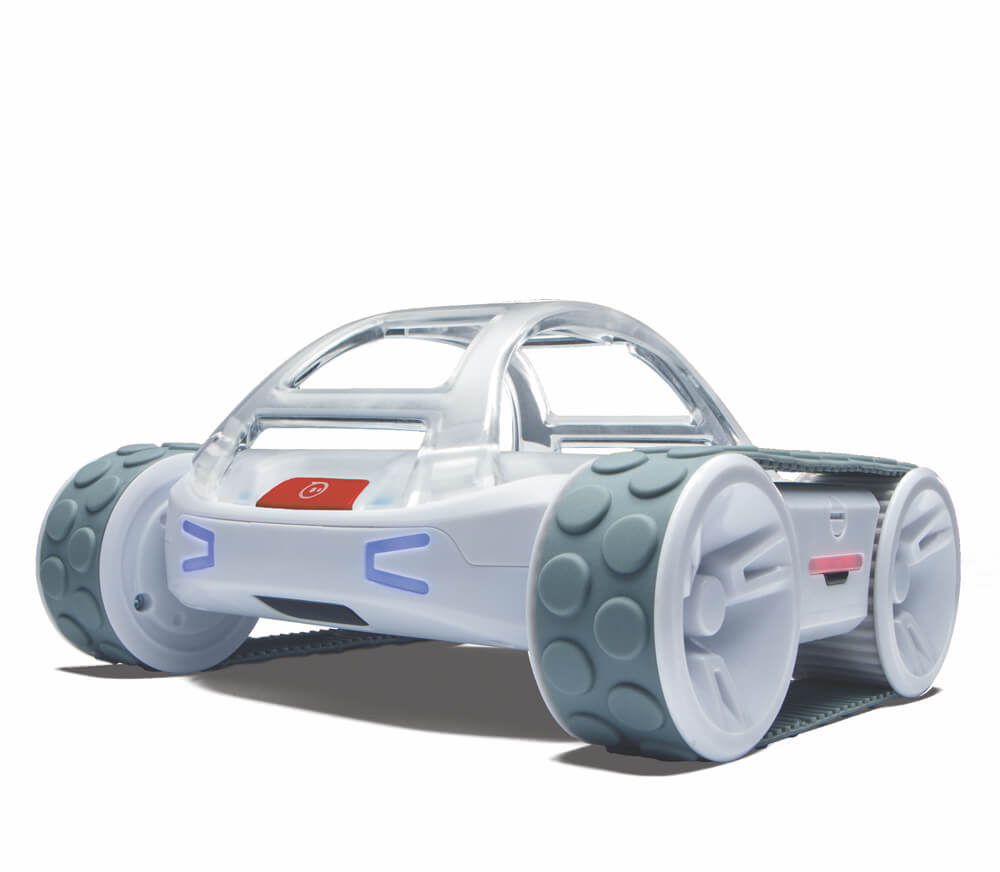
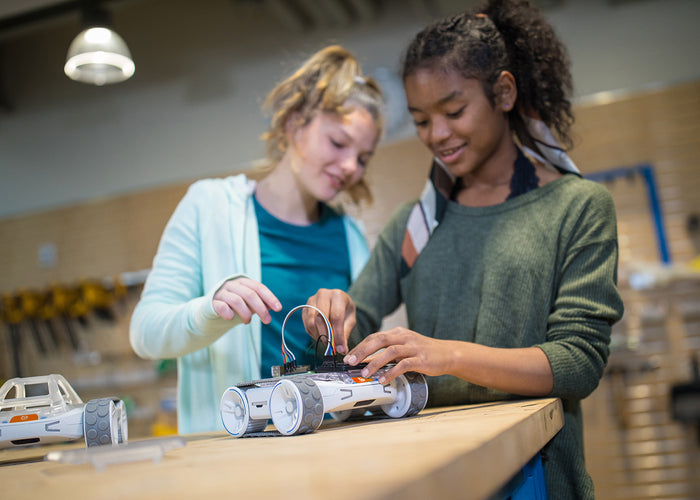
RVR+ is Sphero’s revolutionary take on the programmable robot and is optimized for the upper primary, high school classrooms and makerspaces. It’s drivable right out of the box, packed with a diverse suite of sensors, and built for customization. RVR+ is expandable and made for novice to advanced programmers. Students learn coding skills and computer science basics with the free Sphero Edu app or advanced programmers can level up with the Public Sphero SDK to program with Python and connect third-party hardware.
Features
GO-ANYWHERE, DO-ANYTHING PROGRAMMABLE ROBOT - Our most versatile programmable robot yet, packed with a diverse suite of sensors and built for customization. Drive RVR+ precisely and accurately right out of the box – no assembly or complicated setup required.
ADVANCED SENSORS - Packed with on-board sensors including an improved colour sensor allowing for more accuracy in programming RVR+ to see colours in its environment, a light sensor, IR, accelerometer, and gyroscope.
ENHANCED GEARBOX - The gearbox has been redesigned to improve torque, payload capacity, and durability to take your inventions even further.
PROGRAM IT: Use the free Sphero Edu app for an introduction to computer science and programming. Students can program RVR with draw & drive, blocks, or JavaScript. RVR+ can also be programmed using the Sphero Public SDK and API libraries for more advanced hackers and makers, making it the ultimate programming robot for coders of all levels.
BUILD ON IT - Simple enough for a novice to get started, but advanced enough to create anything your imagination can come up with. RVR+s customizable expansion plate lets you connect most third-party hardware including Raspberry Pi, Arduino, micro:bit, and Sphero’s own littleBits.
RECHARGEABLE BATTERY - New-and-improved rechargeable and swappable battery to keep programs, inventions, and classroom projects running without any downtime.
What’s in the RVR+ robot box?
RVR+ mobile robot
Removable cover plate and developer plate with quick-release button
Removable, protective roll cage
Removable and rechargeable battery
Universal, 4-Pin UART expansion port for connecting 3rd party hardware like Raspberry Pi, Arduino, or micro:bit (products sold separately)
5V 2.1A USB-A onboard connectivity to power your projects using RVR+’s battery
Sphero Edu app (available for download on iOS, Android, and Chrome OS)


Sphero RVR+ Multi-Pack
$2,727.26 ex GST
($2,999.99 inc GST)
FREE Shipping on this Product
The RVR+ Multi-Pack brings Sphero’s revolutionary take on the programmable robot to the entire class with 6 RVR+ robots and RVR+ Educator Guide. They’re drivable right out of the box, packed with a diverse suite of sensors, and built for customization. RVR+ is expandable and made for novice to advanced programmers in 6th–12th grades.
Features
ENGAGE THE ENTIRE CLASS - Engage up to 18 students with 6 RVR+ robots and accessories. Supplement the Multi-Pack with individual RVR+ robots to accommodate more students.
TEACH WITH CONFIDENCE - The RVR+ Educator Guide contains tips for successful rollout of RVR+ in your classroom as well as activities.
ENDLESS CLASSROOM POSSIBILITIES - The free Sphero Edu app contains hundreds of lessons to teach coding and computer science with RVR+, and advanced programmers can level up with the Public Sphero SDK and connect third-party hardware capabilities with Python.
EXPANDABLE PLATFORM - RVR+ features a 4-pin UART and an onboard power source, allowing students to connect and run third-party hardware like a Raspberry Pi, BBC micro:bit, or Sphero's very own littleBits. RVR+ allows your inventions and mobile projects to go even further with an advanced colour sensor and an enhanced gearbox giving more torque and providing the flexibility to program RVR+ to do whatever you can imagine.
What’s in the Sphero RVR+ Multi-Pack box?
6 RVR+ programmable robots
1 RVR+ Educator Guide
6 removable and rechargeable batteries
6 removable, protective roll cages
6 expansion mounting plates
6 USB-A to USB-C charging cables
6 sets of colour cards
1 getting started card
1 quick start guide


Sphero Computer Science Foundations - Course 1
$319.00 ex GST
$336.35 ex GST ($350.90 inc GST)
$336.35 ex GST ($350.90 inc GST)
Computer Science Foundations (CSF) by Sphero is a supplemental, standards -aligned curriculum designed to be taught in the classroom with Sphero robots. CSF features three courses, each with their own spiral-bound Educator Guide. Using CSF, teachers and students will explore STEAM principles through creative coding.
CSF features student-facing instructions and pre-loaded blocks for every activity. Teachers can access every lesson in the Sphero Edu app by scanning the QR code or by navigating to the CS Foundations tab under "Activities" in the app. Teachers can then assign individual lessons to each student's Workbook. Many lessons have pre-loaded blocks so students can start coding right away.
Course 1 features three themes, each theme comprising eight lessons. By the end of Course 1, students will demonstrate proficiency with the Draw Canvas and know how to use block programs to manipulate lights and sounds and create loops and conditionals.
Course 1 Content: Arts - using Sphero robots, students will use the Draw and Block Canvas to paint, write poetry, compose music, and dance.
Shapes & Numbers - as students progress to programming with blocks, they'll learn how to connect numbers in equations, play dice games, design guessing games, and create their own figure skating routines.
Nature - students will use their polycarbonate robotic ball to understand the natural world by mimicking the movement of animals, programming a school of fish, and modelling sleep patterns.
By the end of Course 1 students will be able to:
Create their own Draw programs‚ including movement (direction and speed) and lights
Manipulate and sequence movement, lights and sound Blocks.
Create and animate their own designs on the BOLT LED matrix.
Create Block programs with 1 to 2 simple controls, including loop forever and loop x times.
Display a basic understanding of how 1-2 more complex controls, including loop until, if/then, and if/else affect programs.
Explain how conditionals use sensors, comparators, and operators to make decisions.
Read and interpret sensor data from all Draw and basic Block programs.
What's included:
A spiral-bound Course Educator Guide book containing 24 lessons
A unique access code that grants a perpetual license to all digital student-facing materials and content
ACARA and NSW Curriculum Curriculum links for ACARA and NSW are available here.
CS Foundation Course 1 Sample Activities Click here for CS Foundation Course 1 sample activities. CS Foundation Course 1 Sample Pages


Sphero Computer Science Foundations - Course 3
$319.00 ex GST
$336.35 ex GST ($350.90 inc GST)
$336.35 ex GST ($350.90 inc GST)
Computer Science Foundations (CSF) by Sphero is a supplemental, standards-aligned curriculum designed to be taught in the classroom with Sphero robots. CSF features three courses, each with their own spiral-bound Educator Guide. Using CSF, teachers and students will explore STEAM principles through creative coding.
CSF features student-facing instructions and pre-loaded blocks for every activity. Teachers can access every lesson in the Sphero Edu app by scanning the QR code or by navigating to the CS Foundations tab under "Activities" in the app. Teachers can then assign individual lessons to each student's Workbook. Many lessons have pre-loaded blocks so students can start coding right away.
Course 3 features three themes, each theme comprising eight lessons. By the end of Course 3, students will be able to develop complex programs with the Block Canvas and rewrite simple block programs in JavaScript.
Course 3 Content: Missions - in this series of lessons, students will become critical thinkers and problem-solvers as they puzzle through obstacle courses, lockboxes, secret codes, and more.
Navigation - from exploring how animals migrate to planning a road trip, this series of lessons brings the world of navigation to life for students through hands-on programming with their Sphero robots.
Brain Breakers - in this theme, students develop their problem-solving and collaboration skills while creating secret codes, solving riddles and cracking a bank robbery.
By the end of Course 3 students will be able to:
Manipulate variables (numbers, sound) in the Block Canvas.
Apply conditionals without guidance that utilise sensors, comparators.
Develop their own complex programs in Block programming.
Read and interpret simple programs written in JavaScript involving movement, lights, sounds, and loops.
Troubleshoot JavaScript to fix syntax errors.
Rewrite simple Block programs in JavaScript.
What's included:
A spiral-bound Course Educator Guide book containing 24 lessons
A unique access code that grants a perpetual license to all digital student-facing materials and content
ACARA and NSW Curriculum Curriculum links for ACARA and NSW are available here.
CS Foundation Course 3 Sample Activities Click here for CS Foundation Course 3 sample activities. CS Foundation Course 3 Sample Pages


Sphero Computer Science Foundations - Course 2
$319.00 ex GST
$336.35 ex GST ($350.90 inc GST)
$336.35 ex GST ($350.90 inc GST)
Computer Science Foundations (CSF) by Sphero is a supplemental, standards-aligned curriculum designed to be taught in the classroom with Sphero robots. CSF features three courses, each with their own spiral-bound Educator Guide. Using CSF, teachers and students will explore STEAM principles through creative coding.
CSF features student-facing instructions and pre-loaded blocks for every activity. Teachers can access every lesson in the Sphero Edu app by scanning the QR code or by navigating to the CS Foundations tab under "Activities" in the app. Teachers can then assign individual lessons to each student's Workbook. Many lessons have pre-loaded blocks so students can start coding right away.
Course 2 features three themes, each theme comprising eight lessons. By the end of Course 2, students will demonstrate a mastery of block programming by manipulating sensors, loops, conditionals, variables, and functions.
Course 2 Content: Empathy - with their robots and Block programming skills, students will learn to communicate clearly with their partners, offer praise and encouragement, and grow their classroom community.
Story Telling - in this series of Block lessons, students will use their Sphero robots to represent the elements of a story, develop dialogue, retell historical events, and even overcome writer's block.
Game Design - bring out your inner gamer through a series of lessons designed to develop your Block programming skills‚ play Bingo, search for hidden treasure and build your own set of dice.
By the end of Course 2 students will be able to:
Use a series of nested controls‚ including loops & conditionals‚ to create more complex programs.
Be able to use basic comparators & operators in their conditionals.
Use functions as mini programs to perform a specific task within their larger program.
Use and manipulate all Sphero sensors to meet appropriate purposes in their programs.
Explain how variables are used in a program.
Explain how Blocks equate to JavaScript code and manipulate specific sections of JS code.
What's included:
A spiral-bound Course Educator Guide book containing 24 lessons
A unique access code that grants a perpetual license to all digital student-facing materials and content
ACARA and NSW Curriculum Curriculum links for ACARA and NSW are available here.
CS Foundation Course 2 Sample Activities Click here for CS Foundation Course 2 sample activities. CS Foundation Course 2 Sample Pages


Sphero RVR+ Spare Battery (RVR Compatible)
$127.26 ex GST
($139.99 inc GST)
New-and-improved rechargeable and swappable battery to keep RVR and RVR+ programs, inventions, and classroom projects running without any downtime.
Replace your battery or power up your RVR+ while your other battery charges. Pick up an additional battery so that driving, coding, and hacking never stop.
Fun never ends - charge one battery while the other is working
High capacity - delivers enough juice to power RVR+ and anything you add to it
Compatible with RVR+ and RVR.


